


 Dylan Hoback
Accu-Tube
Dylan Hoback
Accu-Tube
My Praxie analytics software transformed our operations, enabling data-driven decisions and streamlining our manufacturing process.

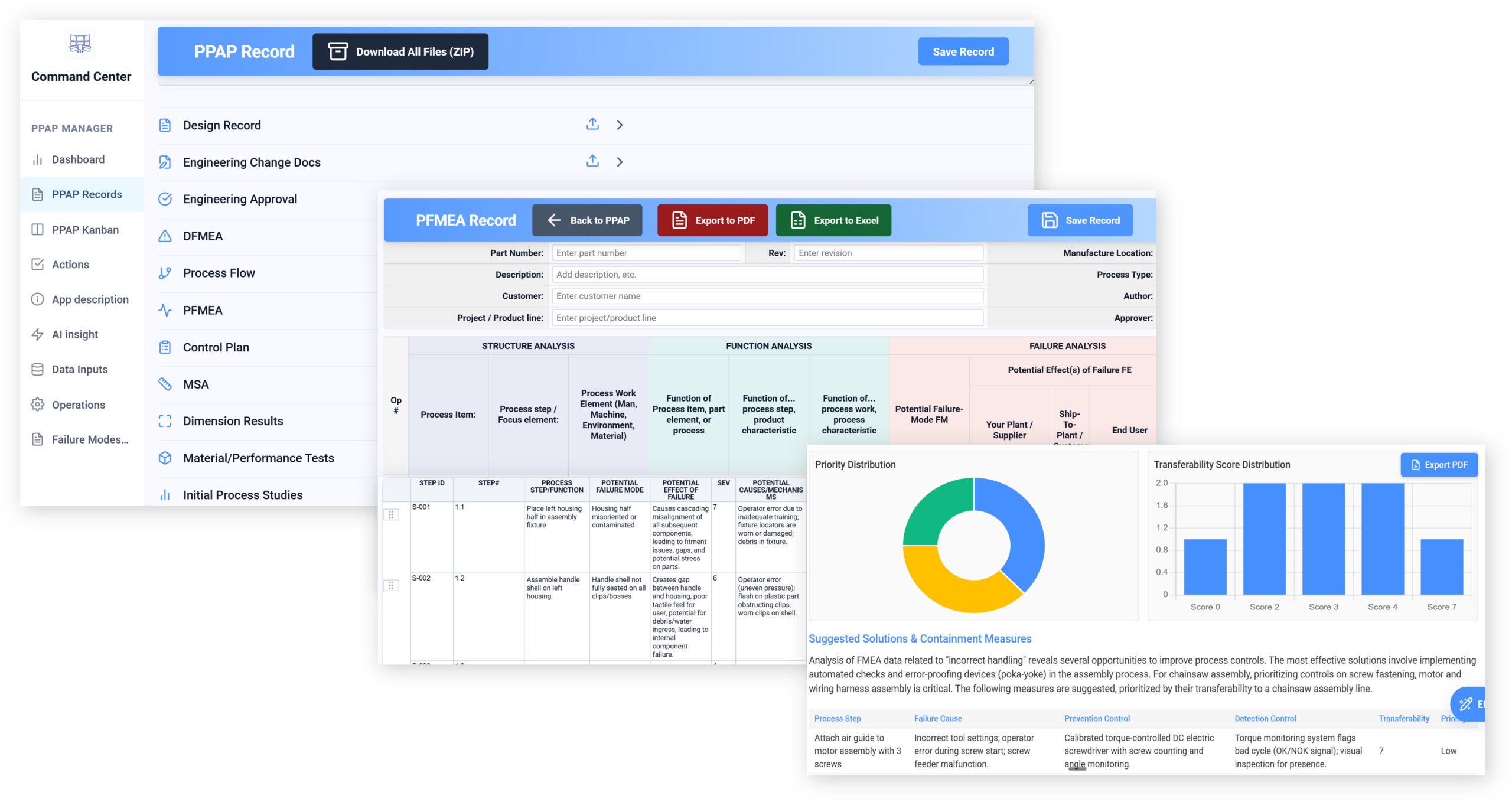
Replace APQP binders and FMEA spreadsheets with AI that keeps the deliverables connected to the actual process — so risk identified at design is still being controlled at launch.
AI APQP, PPAP & FMEAfor quality and launch leaders
Customer Success Stories
Dylan Hoback
Accu-Tube
“My Praxie analytics software transformed our operations, enabling data-driven decisions and streamlining our manufacturing process.
 Jason Carpenter
Environmental Pest Management
Jason Carpenter
Environmental Pest Management
“With Praxie, I found a way to take what was in documents and spreadsheets and provide my team with a visual application environment to drive our strategy with full accountability.
 Elizabeth Pridham
Perfection Fresh
Elizabeth Pridham
Perfection Fresh
“Praxie dramatically improved our process through digital transformation. We now have visibility and can drive decisions at a fraction of the time.
 Scott Russell
NUCOR Vulcraft
Scott Russell
NUCOR Vulcraft
“I would heartily recommend the Praxie team to any organization seeking to seriously undertake a lasting and successful innovation process.
 Mike Bainbridge
Dover Food Retail
Mike Bainbridge
Dover Food Retail
“Our MFG Ops application greatly improved our daily management initiatives. It is easy to see how we are doing, identify issues, and track improvements—no matter where we sit.
 Jeff Piotrowicz
ChemLink
Jeff Piotrowicz
ChemLink
“With Praxie we've created a way to report on complex projects that gives management full visibility. Executives have visibility to projects, assignments, and more at their fingertips.
 Maureen Thompson
American Nurses Association
Maureen Thompson
American Nurses Association
“Our Praxie App makes it easy to track progress on strategic objectives across the organization and includes an executive-level dashboard with real-time reports to the board on key initiatives.
 Tom Anderson
Springfield Armory
Tom Anderson
Springfield Armory
“Praxie is used every day to track and analyze every aspect of production, quality, safety, and more. We improved quality by 10%.
 Peggie Pelosi
Innovators Alliance
Peggie Pelosi
Innovators Alliance
“Almost overnight, Praxie created a customized solution for our 100 member organizations across Canada to drive strategy and innovation.
 Kate Merton
Anthem
Kate Merton
Anthem
“Praxie's innovation solution stood out from other options because it can be customized so quickly to fit our exact process requirements. Plus, it is incredibly easy to use and manage.
Dylan Hoback
Accu-Tube
“My Praxie analytics software transformed our operations, enabling data-driven decisions and streamlining our manufacturing process.
Jason Carpenter
Environmental Pest Management
“With Praxie, I found a way to take what was in documents and spreadsheets and provide my team with a visual application environment to drive our strategy with full accountability.
Elizabeth Pridham
Perfection Fresh
“Praxie dramatically improved our process through digital transformation. We now have visibility and can drive decisions at a fraction of the time.
Scott Russell
NUCOR Vulcraft
“I would heartily recommend the Praxie team to any organization seeking to seriously undertake a lasting and successful innovation process.
Mike Bainbridge
Dover Food Retail
“Our MFG Ops application greatly improved our daily management initiatives. It is easy to see how we are doing, identify issues, and track improvements—no matter where we sit.
Jeff Piotrowicz
ChemLink
“With Praxie we've created a way to report on complex projects that gives management full visibility. Executives have visibility to projects, assignments, and more at their fingertips.
Maureen Thompson
American Nurses Association
“Our Praxie App makes it easy to track progress on strategic objectives across the organization and includes an executive-level dashboard with real-time reports to the board on key initiatives.
Tom Anderson
Springfield Armory
“Praxie is used every day to track and analyze every aspect of production, quality, safety, and more. We improved quality by 10%.
Peggie Pelosi
Innovators Alliance
“Almost overnight, Praxie created a customized solution for our 100 member organizations across Canada to drive strategy and innovation.
Kate Merton
Anthem
“Praxie's innovation solution stood out from other options because it can be customized so quickly to fit our exact process requirements. Plus, it is incredibly easy to use and manage.
Trusted by Top Companies Worldwide


Filling in the FMEA was the easy part. Making sure the controls it specified are actually running at launch is the job.
“Your PPAP was approved. Why are we seeing this defect?”
“That control plan was written for a different process revision.”
A binder that satisfied the gate, and a launch that found the problems anyway.
You do not need more documents. You need the identified risk to stay connected to the process — through to launch.
Most quality and launch leaders recognise at least four of these. If you recognise six, the rest of this page is written for you.
None of this is a documentation problem. It is a continuity problem.
Is this you?
Worked example — multi-programme launch organisationSeveral programmes, hundreds of failure modes, and deliverables produced to satisfy a review date.
Because the FMEA, control plan and process documents were maintained separately, risk identified at design drifted out of sync with what the line actually did — and the same failure modes reappeared programme after programme.
With those deliverables connected, a change in one surfaces in the others, high-risk items stay traceable to a live control, and prior-programme lessons are available rather than remembered.
A binder that satisfied the gate.
Risk still connected to the line.
Less time drafting, formatting, and assembling launch documents.
Better cross-document consistency and fewer manual update mistakes.
Engineering and quality changes move through related documents faster.
Teams prepare approval packages and evidence faster.
Traceability and evidence are easier to find when customers or auditors ask.
Less rework across approvals, supplier documents, and document packages.
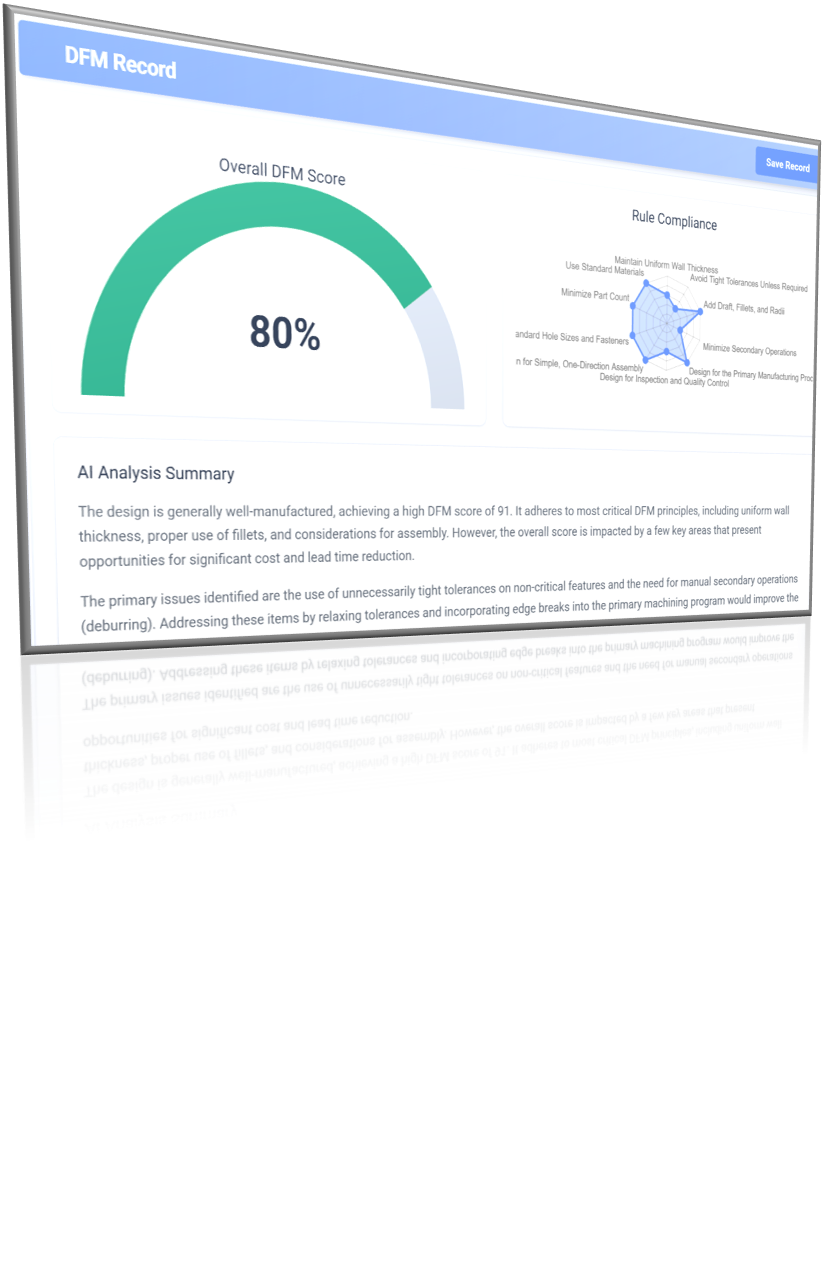
Avoid spreadsheets and rigid legacy tools. Praxie’s AI-powered Design for Manufacturing (DFM) brings manufacturability into early design, reducing risk, cost, and rework while improving engineering–manufacturing alignment and accelerating high-quality launches.
Define manufacturing requirements: Identify materials, processes, cost targets, volumes, and supplier capabilities early.
Design for process capability: Align part features, tolerances, and materials with proven manufacturing processes.
Simplify and standardize designs: Reduce part count, complexity, and variation to improve efficiency and consistency.
Identify manufacturing risks: Detect potential production, tooling, and quality risks before design release.
Validate with manufacturing input: Collaborate across engineering, manufacturing, and suppliers to confirm buildability.
Ensure production readiness: Use pilot builds and feedback to refine designs and support continuous improvement.
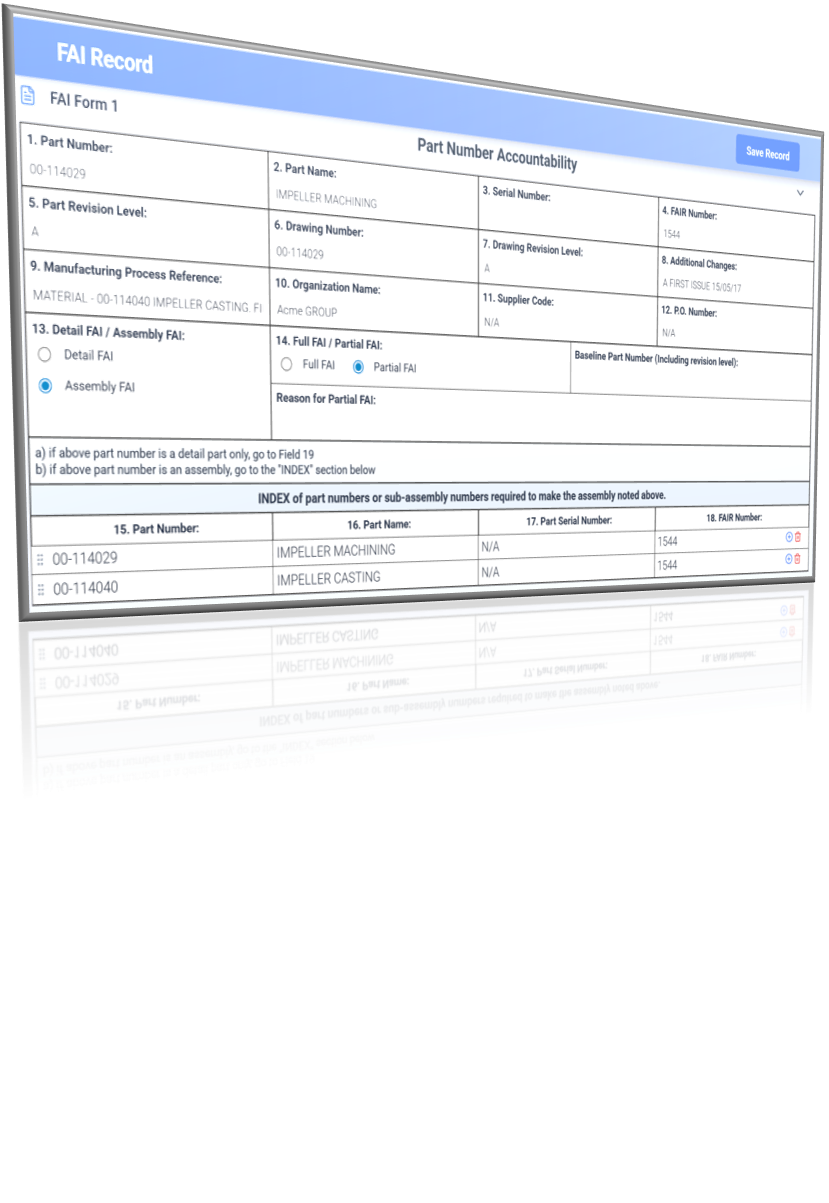
First Article Inspection (FAI) is a quality verification process used by engineering, manufacturing, and quality teams to confirm that a production process can consistently produce parts that meet all engineering and customer requirements. Conducted on the first production run or after significant process changes, FAI validates that materials, dimensions, specifications, and documentation align with the approved design. By verifying conformity early, FAI helps prevent defects, reduce rework, and ensure confidence before full-scale production begins.
FAI Key Elements:
Part Accountability: Verify that the correct part number, revision level, and manufacturing documentation are used for the inspection.
Material Verification: Confirm that materials and special processes meet specified requirements and certifications.
Dimensional Inspection: Measure and record all design characteristics to ensure they meet engineering drawings and tolerances.
Special Process Validation: Ensure processes such as heat treatment, coating, or welding meet required standards and approvals.
Documentation & Traceability: Record inspection results and maintain documentation linking materials, processes, and measurements to the inspected part.
Approval & Release: Review FAI results and approve the process before proceeding to full production.

Advanced Product Quality Planning (APQP) is a structured approach used by engineering, quality, and project teams to ensure product quality from early design through production. By focusing on prevention and early risk identification, APQP aligns customer requirements with manufacturing processes, improves resource efficiency, and supports consistent, high-quality launches.
APQP Phases:
Plan & Define: Capture customer needs, define the product, and establish program goals.
Product Design Verification: Validate the design meets requirements and identify potential risks early.
Process Design Verification: Ensure manufacturing processes can consistently meet design and quality targets.
Product & Process Validation: Test product and process under real production conditions.
Feedback & Corrective Action: Use production feedback to address gaps and drive continuous improvement.
Control Plan: Define ongoing monitoring and controls to maintain consistent quality.

The Production Part Approval Process (PPAP) confirms that APQP activities are complete and that the manufacturing process can consistently produce parts meeting customer engineering and quality requirements. Used by engineering, quality, suppliers, and program teams, PPAP provides objective evidence that design intent, process controls, and risk mitigation are fully validated before production launch.
PPAP Elements:
Design & Change Verification: Confirm approved designs and engineering changes are correctly implemented.
Process & Risk Alignment: Ensure process flows, PFMEAs, and control plans reflect actual production.
Measurement System Analysis (MSA): Verify inspection and measurement systems are capable and reliable.
Process Capability: Demonstrate stable processes that meet quality requirements.
Product & Process Validation: Validate production parts meet all design and performance criteria.
PPAP Submission & Approval: Submit required evidence and obtain customer approval.
Production Release & Control: Establish PPAP as the baseline for controlled, ongoing production.

Failure Mode and Effects Analysis (FMEA) is a preventive method used to identify, assess, and reduce potential product or process failures before they occur. Used by cross-functional engineering and quality teams, FMEA focuses on risk prevention by systematically evaluating how designs or processes could fail and prioritizing actions to reduce risk. Within APQP, FMEA informs design decisions, process controls, and validation throughout the product lifecycle.
FMEA Steps:
Define Scope: Identify the product, process, and boundaries of the analysis.
Functions & Requirements: Document intended functions and performance expectations.
Failure Modes: Identify how each function or step could fail.
Effects & Causes: Assess impacts of failure and determine root causes and existing controls.
Risk Prioritization: Rate severity, occurrence, and detection to focus on highest risks.
Corrective Actions: Define, assign, and track actions to reduce risk.
Review & Update: Keep FMEA current as designs, processes, and lessons learned evolve.
Which launch risk did you identify and then lose track of?
Now select a day and time below.
I am raw html block.
Click edit button to change this html
Mid-Sized Metal Fabricator & Custom Machine Shop
A simplified example of how AI-powered automated quality documentation helps a metal fabricator and custom machine shop manage dozens of customers, part-specific requirements, engineering changes, inspections, approvals, and APQP documentation packages without spreadsheet chaos.
Customer-specific launch documentation that used to take days can now be assembled, drafted, and reviewed in
hours.APQP documents, control plans, PFMEAs, inspection plans, drawings, revisions, supplier certs, and customer approvals.
High-variation customer requirementsEvery requirement, characteristic, inspection method, approval, and change needs a clear connection back to the source.
End-to-end documentation traceabilityLess time assembling documents and more time reviewing quality-critical content.
Reduced copy/paste mistakes, missed revisions, and inconsistent characteristics.
Requirements, evidence, approvals, changes, and customer deliverables are easier to trace.
We used to rebuild APQP packages customer by customer. Now the system helps us generate, check, and update the documentation before launch risks turn into customer escalations.
The objections we hear in the first 20 minutes — answered plainly.
Answer: The AI helps generate, update, and cross-check documentation using approved requirements, drawings, BOMs, process flows, risks, inspection data, and prior templates. Teams remain in control because outputs can be reviewed, edited, approved, and traced back to source inputs.
Answer: It can support APQP, PPAP, FMEA, FAI, control plans, inspection plans, supplier documentation, launch checklists, approval packages, and related quality records. The goal is not just faster drafting — it is keeping the full documentation set aligned as requirements change.
Answer: The system can identify impacted documents, highlight required updates, and help propagate changes across connected records. This reduces missed updates, duplicate work, and inconsistencies between FMEAs, control plans, inspection plans, drawings, and approval packages.
Answer: Yes. Praxie can organize requirements, evidence, revisions, approvals, and supporting records in one workspace so quality teams can quickly show what changed, who approved it, where the data came from, and which documents were affected.
Answer: Yes. Spreadsheets and folders are hard to govern, QMS modules can be rigid, and generic AI tools usually lack manufacturing context. Praxie combines AI document generation, workflow automation, quality-process context, approvals, and traceability in one adaptable manufacturing workspace.
Send us one of your current APQP programmes. We’ll show you what Praxie would connect — your FMEA, your control plan, your process.
No cost, no obligation — and you keep what we find either way.