


 Dylan Hoback
Accu-Tube
Dylan Hoback
Accu-Tube
My Praxie analytics software transformed our operations, enabling data-driven decisions and streamlining our manufacturing process.

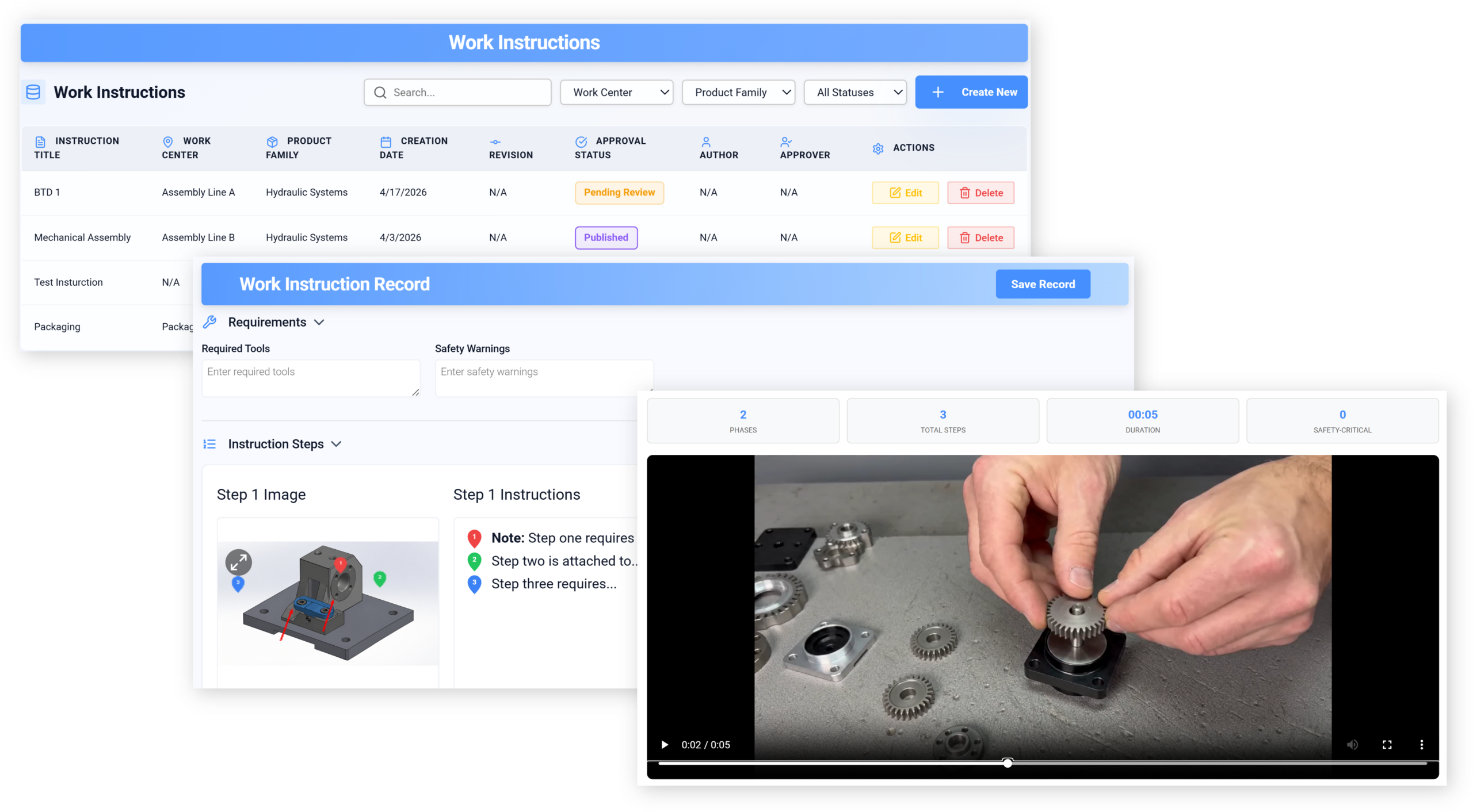
Replace PDFs and binders with AI that turns a video of the job into a clear, current work instruction — versioned, translated and actually used at the station.
AI work instructions & SOPsfor manufacturing and training leaders
Customer Success Stories
Dylan Hoback
Accu-Tube
“My Praxie analytics software transformed our operations, enabling data-driven decisions and streamlining our manufacturing process.
 Jason Carpenter
Environmental Pest Management
Jason Carpenter
Environmental Pest Management
“With Praxie, I found a way to take what was in documents and spreadsheets and provide my team with a visual application environment to drive our strategy with full accountability.
 Elizabeth Pridham
Perfection Fresh
Elizabeth Pridham
Perfection Fresh
“Praxie dramatically improved our process through digital transformation. We now have visibility and can drive decisions at a fraction of the time.
 Scott Russell
NUCOR Vulcraft
Scott Russell
NUCOR Vulcraft
“I would heartily recommend the Praxie team to any organization seeking to seriously undertake a lasting and successful innovation process.
 Mike Bainbridge
Dover Food Retail
Mike Bainbridge
Dover Food Retail
“Our MFG Ops application greatly improved our daily management initiatives. It is easy to see how we are doing, identify issues, and track improvements—no matter where we sit.
 Jeff Piotrowicz
ChemLink
Jeff Piotrowicz
ChemLink
“With Praxie we've created a way to report on complex projects that gives management full visibility. Executives have visibility to projects, assignments, and more at their fingertips.
 Maureen Thompson
American Nurses Association
Maureen Thompson
American Nurses Association
“Our Praxie App makes it easy to track progress on strategic objectives across the organization and includes an executive-level dashboard with real-time reports to the board on key initiatives.
 Tom Anderson
Springfield Armory
Tom Anderson
Springfield Armory
“Praxie is used every day to track and analyze every aspect of production, quality, safety, and more. We improved quality by 10%.
 Peggie Pelosi
Innovators Alliance
Peggie Pelosi
Innovators Alliance
“Almost overnight, Praxie created a customized solution for our 100 member organizations across Canada to drive strategy and innovation.
 Kate Merton
Anthem
Kate Merton
Anthem
“Praxie's innovation solution stood out from other options because it can be customized so quickly to fit our exact process requirements. Plus, it is incredibly easy to use and manage.
Dylan Hoback
Accu-Tube
“My Praxie analytics software transformed our operations, enabling data-driven decisions and streamlining our manufacturing process.
Jason Carpenter
Environmental Pest Management
“With Praxie, I found a way to take what was in documents and spreadsheets and provide my team with a visual application environment to drive our strategy with full accountability.
Elizabeth Pridham
Perfection Fresh
“Praxie dramatically improved our process through digital transformation. We now have visibility and can drive decisions at a fraction of the time.
Scott Russell
NUCOR Vulcraft
“I would heartily recommend the Praxie team to any organization seeking to seriously undertake a lasting and successful innovation process.
Mike Bainbridge
Dover Food Retail
“Our MFG Ops application greatly improved our daily management initiatives. It is easy to see how we are doing, identify issues, and track improvements—no matter where we sit.
Jeff Piotrowicz
ChemLink
“With Praxie we've created a way to report on complex projects that gives management full visibility. Executives have visibility to projects, assignments, and more at their fingertips.
Maureen Thompson
American Nurses Association
“Our Praxie App makes it easy to track progress on strategic objectives across the organization and includes an executive-level dashboard with real-time reports to the board on key initiatives.
Tom Anderson
Springfield Armory
“Praxie is used every day to track and analyze every aspect of production, quality, safety, and more. We improved quality by 10%.
Peggie Pelosi
Innovators Alliance
“Almost overnight, Praxie created a customized solution for our 100 member organizations across Canada to drive strategy and innovation.
Kate Merton
Anthem
“Praxie's innovation solution stood out from other options because it can be customized so quickly to fit our exact process requirements. Plus, it is incredibly easy to use and manage.


Writing the SOP was the easy part. Keeping it true, and getting it used at the station, is the job.
“Show me the current revision, and who was trained on it.”
“Nobody does it the way the document says.”
A binder at the station, a PDF on the server, and the real method in one person's head.
You do not need better documents. You need the method to be captured as it is actually done — and kept current.
Most manufacturing and training leaders recognise at least four of these. If you recognise six, the rest of this page is written for you.
None of this is a documentation problem. It is a capture problem.
Is this you?
Worked example — multi-station assembly operationDozens of stations, several languages, and SOPs written by whoever could find the time.
Because documenting a job meant someone sitting down to write it, instructions were created once and then drifted — and the real method stayed with the people who had always done it.
With AI turning a recording of the job into a structured instruction, capture stops being the bottleneck, revisions stay close to practice, and translation is no longer a separate project.
A binder and a buddy.
The job as it is actually done.
Instructions and SOPs are generated with less manual drafting.
Teams spend less time formatting, rewriting, and reconciling documents.
Visual, step-based guidance helps new operators ramp faster.
Clear steps, checks, and visuals reduce avoidable variation.
Related procedures and SOPs are easier to revise and republish.
Controlled revisions, approvals, and signoffs are easier to trace.
Which job is hardest to train someone on?
Now select a day and time below.
Midwestern Complex Machinery Manufacturer | 200+ Shop-Floor Workers
A simplified example of how a Midwestern manufacturer of complex machinery moved from PDF-based work instructions stored in SharePoint to connected, AI-powered work instructions integrated with MES — while extending SOPs across production, supply chain, packaging, shipping, and support functions.
Work instructions and SOPs that once required manual drafting from PDFs, meetings, and tribal knowledge can now be generated and revised in
hours, not weeks.More than 200 shop-floor workers need accurate guidance across fabrication, assembly, testing, packaging, shipping, and rework scenarios.
High-mix standard workSOPs extend beyond production into supply chain, packaging, shipping, quality, training, and cross-functional operating procedures.
Enterprise tribal knowledge captureLess manual drafting, formatting, and rework when creating or revising instructions.
Operators follow current standard work with embedded visual guidance and checks.
Tribal knowledge is captured across production, supply chain, packaging, shipping, and quality.
Connected MES work instructions guide operators through assembly, fabrication, inspection, rework, testing, setup, and changeover steps.
Point-of-work guidance + traceabilitySOPs capture know-how across supply chain, receiving, kitting, packaging, shipping, quality, safety, maintenance, training, and customer-specific processes.
Reusable organizational knowledgeWe moved from static PDFs in SharePoint to connected work instructions in MES — and finally captured the SOP knowledge that used to live across the organization.
The objections we hear in the first 20 minutes — answered plainly.
Answer: The AI can ingest existing Word documents, PDFs, SOPs, manuals, photos, and videos, then extract steps, tools, safety warnings, quality checks, and acceptance criteria. Teams can review, edit, approve, and publish the resulting instructions instead of starting from a blank page.
Answer: Yes. Training videos and operator demonstrations can be converted into structured procedures with step-by-step guidance, visual references, checkpoints, and suggested wording. The video becomes a source of standard work rather than informal tribal knowledge.
Answer: They can become inputs to the AI-powered instruction center. Instead of leaving documents buried in folders, the system can extract reusable content, identify missing information, structure the steps, and help convert old files into connected, controlled work instructions and SOPs.
Answer: Operators get current instructions at the point of work, with clear steps, visuals, quality checks, safety reminders, signoffs, and role-based guidance. This helps reduce variation, training time, rework, and confusion over which document is the latest version.
Answer: Yes. SOPs can capture tribal knowledge across supply chain, receiving, kitting, packaging, shipping, maintenance, quality, safety, customer service, and administrative processes. The goal is to create a connected operating knowledge base, not just shop-floor instructions.
Answer: AI can accelerate creation, but teams still control the process. Instructions and SOPs can include approval workflows, ownership, version history, change notes, effective dates, signoffs, and audit trails so updates are traceable and controlled.
Answer: No. It supports them. AI reduces manual drafting, formatting, searching, and rewriting, while people validate the content, make process decisions, approve changes, and ensure instructions match real-world work.
Send us a video of one real job. We’ll show you what Praxie would turn it into — your steps, your standards, your language.
No cost, no obligation — and you keep what we find either way.