


 Dylan Hoback
Accu-Tube
Dylan Hoback
Accu-Tube
My Praxie analytics software transformed our operations, enabling data-driven decisions and streamlining our manufacturing process.

Replace paper travelers, whiteboards, and verbal andon calls with AI that releases work orders, guides execution, tracks takt live, and escalates andon before a small delay becomes a missed shipment.
A super fast way to see how AI work order execution works for your team.
Customer Success Stories
Dylan Hoback
Accu-Tube
“My Praxie analytics software transformed our operations, enabling data-driven decisions and streamlining our manufacturing process.
 Jason Carpenter
Environmental Pest Management
Jason Carpenter
Environmental Pest Management
“With Praxie, I found a way to take what was in documents and spreadsheets and provide my team with a visual application environment to drive our strategy with full accountability.
 Elizabeth Pridham
Perfection Fresh
Elizabeth Pridham
Perfection Fresh
“Praxie dramatically improved our process through digital transformation. We now have visibility and can drive decisions at a fraction of the time.
 Scott Russell
NUCOR Vulcraft
Scott Russell
NUCOR Vulcraft
“I would heartily recommend the Praxie team to any organization seeking to seriously undertake a lasting and successful innovation process.
 Mike Bainbridge
Dover Food Retail
Mike Bainbridge
Dover Food Retail
“Our MFG Ops application greatly improved our daily management initiatives. It is easy to see how we are doing, identify issues, and track improvements—no matter where we sit.
 Jeff Piotrowicz
ChemLink
Jeff Piotrowicz
ChemLink
“With Praxie we've created a way to report on complex projects that gives management full visibility. Executives have visibility to projects, assignments, and more at their fingertips.
 Maureen Thompson
American Nurses Association
Maureen Thompson
American Nurses Association
“Our Praxie App makes it easy to track progress on strategic objectives across the organization and includes an executive-level dashboard with real-time reports to the board on key initiatives.
 Tom Anderson
Springfield Armory
Tom Anderson
Springfield Armory
“Praxie is used every day to track and analyze every aspect of production, quality, safety, and more. We improved quality by 10%.
 Peggie Pelosi
Innovators Alliance
Peggie Pelosi
Innovators Alliance
“Almost overnight, Praxie created a customized solution for our 100 member organizations across Canada to drive strategy and innovation.
 Kate Merton
Anthem
Kate Merton
Anthem
“Praxie's innovation solution stood out from other options because it can be customized so quickly to fit our exact process requirements. Plus, it is incredibly easy to use and manage.
Dylan Hoback
Accu-Tube
“My Praxie analytics software transformed our operations, enabling data-driven decisions and streamlining our manufacturing process.
Jason Carpenter
Environmental Pest Management
“With Praxie, I found a way to take what was in documents and spreadsheets and provide my team with a visual application environment to drive our strategy with full accountability.
Elizabeth Pridham
Perfection Fresh
“Praxie dramatically improved our process through digital transformation. We now have visibility and can drive decisions at a fraction of the time.
Scott Russell
NUCOR Vulcraft
“I would heartily recommend the Praxie team to any organization seeking to seriously undertake a lasting and successful innovation process.
Mike Bainbridge
Dover Food Retail
“Our MFG Ops application greatly improved our daily management initiatives. It is easy to see how we are doing, identify issues, and track improvements—no matter where we sit.
Jeff Piotrowicz
ChemLink
“With Praxie we've created a way to report on complex projects that gives management full visibility. Executives have visibility to projects, assignments, and more at their fingertips.
Maureen Thompson
American Nurses Association
“Our Praxie App makes it easy to track progress on strategic objectives across the organization and includes an executive-level dashboard with real-time reports to the board on key initiatives.
Tom Anderson
Springfield Armory
“Praxie is used every day to track and analyze every aspect of production, quality, safety, and more. We improved quality by 10%.
Peggie Pelosi
Innovators Alliance
“Almost overnight, Praxie created a customized solution for our 100 member organizations across Canada to drive strategy and innovation.
Kate Merton
Anthem
“Praxie's innovation solution stood out from other options because it can be customized so quickly to fit our exact process requirements. Plus, it is incredibly easy to use and manage.





Work Order Execution & ANDON Boards Are Complex — AI Can Help
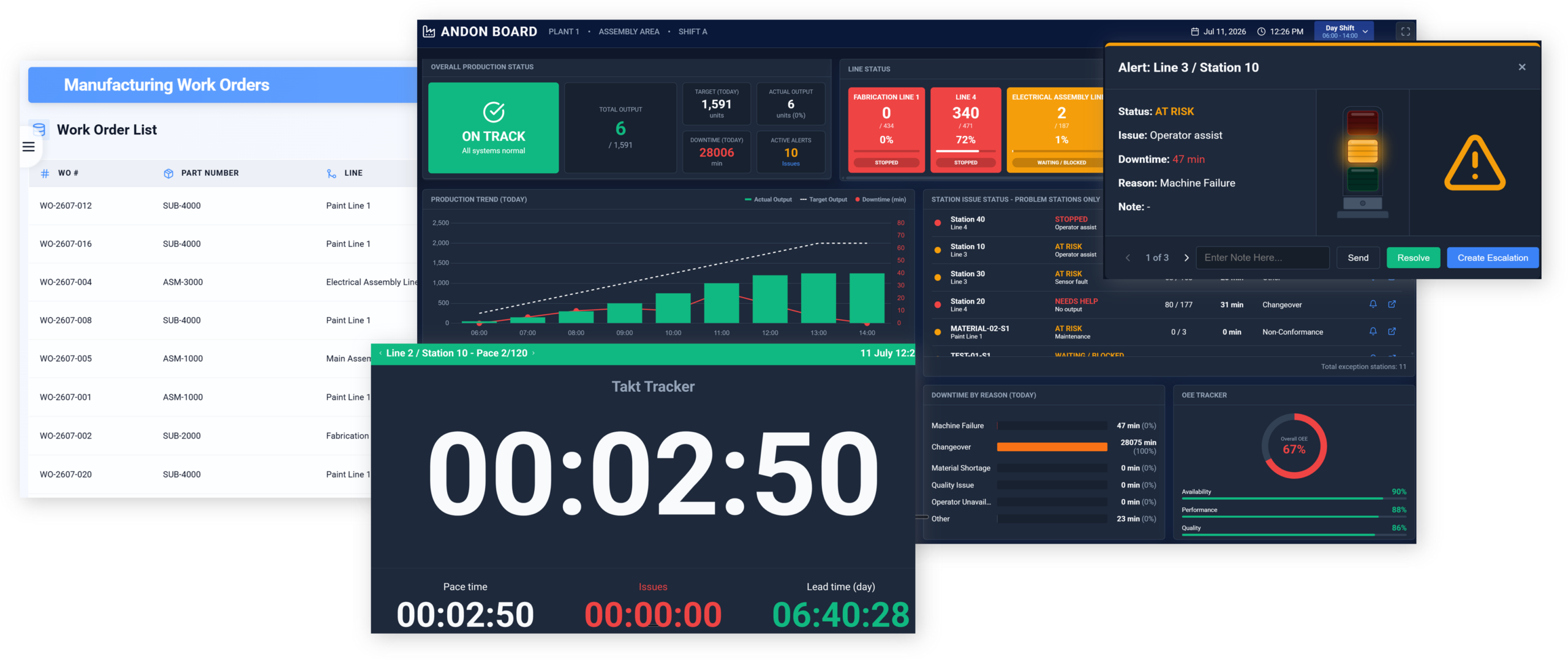
Praxie connects digital work orders, routing steps, station signals, and shop-floor actuals in one live execution system. See every order and every station in real time—then use AI to manage takt-time performance, surface exceptions, trigger escalation, and keep production moving before a small delay becomes a missed shipment.
Reliable execution requires more than showing a work order. The system must continuously compare the plan with reality, coordinate fast responses, and preserve an operational record of what happened.
Praxie connects each production work order to live station execution, takt-time performance, ANDON alerts, escalation workflows, and improvement actions—so operations teams can see what is happening now and act before a delay becomes a missed commitment.
Turn production demand into ready-to-run work orders with the exact routing, standard times, materials, quality checks, and digital instructions required at every station.
Give frontline teams a live, simple execution view that shows what to build now, what comes next, and whether the station is keeping pace with takt.
Use a real-time ANDON board to make the operating condition of every line, cell, and station visible—before a small issue disrupts the whole work order.
Turn an ANDON condition into a fast, accountable response—then preserve the details needed to eliminate recurring loss and improve future work orders.
Bring work orders, station execution, takt-time pacing, quality, downtime, and real-time escalation into one connected operating view—so teams can see issues earlier, respond faster, and keep every line moving.
See planned versus actual cycle time and identify pacing gaps before they affect the order.
Route help requests and escalating issues instantly to the right accountable owner.
Keep production aligned to demand with live run-rate, plan-versus-actual, and WIP monitoring.
Embed quality checks, alerts, containment, and rework workflows directly in the execution path.
Capture issue reasons, response time, recovery actions, and recurring causes across every station.
Give operators, supervisors, maintenance, quality, and leadership the same real-time line status.
A simple view of work order execution and shop-floor visibility options — and why Praxie brings digital work orders, live takt-time performance, ANDON escalation, and continuous improvement together in one operations workspace.
Clear answers to the most common questions manufacturers ask when connecting work orders, station-level execution, takt-time tracking, and ANDON alerts in one live operating system.
Answer: The work order provides the production context—what to build, the routing, planned quantity, work instructions, materials, quality checks, and expected takt time. The ANDON board then turns live shop-floor signals into an operating view, showing which stations are on pace, at risk, stopped, or waiting for help so teams can respond before the delay spreads.
Answer: Yes. Each operation or station can receive the applicable planned takt time from the work order routing or time study. As operators complete units or equipment reports cycle data, the system compares actual cycle time, output pace, and accumulated variance against plan—then highlights green, yellow, or red status based on thresholds you define.
Answer: A yellow condition can signal that a station is falling behind pace, has rising cycle-time variance, or needs attention soon. A red condition can trigger an immediate escalation for a stop, quality hold, material shortage, equipment issue, or safety concern. Praxie can identify the affected work order and station, notify the assigned owner, record the issue, and initiate an action or root-cause workflow.
Answer: Teams can track planned and actual takt time, units completed versus plan, station status, WIP, OEE, availability, performance, first-pass yield, scrap, rework, downtime, micro-stops, response time, and open escalations. Metrics can roll up from the station to the line, shift, work order, assembly, plant, or product family.
Answer: Yes. Praxie can connect work-order and routing context from ERP or MES systems, receive production and equipment events through integrations or webhooks, and use rules to update dashboards and workflows. For physical ANDON lights, a webhook or integration can pass the line, station, alert type, and status to a local gateway or connected light controller so the right red, yellow, or green signal is activated.