


 Dylan Hoback
Accu-Tube
Dylan Hoback
Accu-Tube
My Praxie analytics software transformed our operations, enabling data-driven decisions and streamlining our manufacturing process.

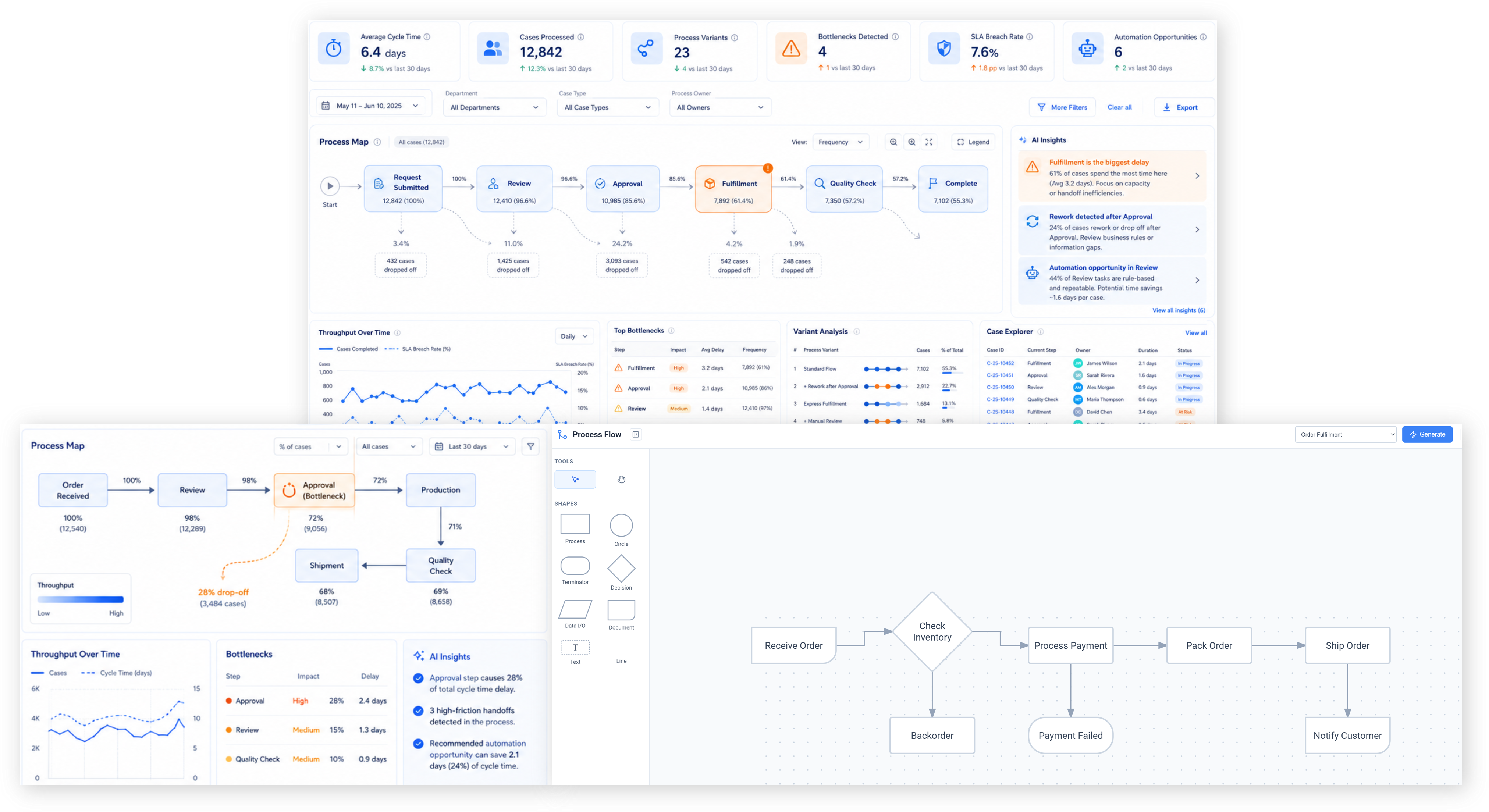
Replace manual, disconnected workflows and spreadsheets with AI that automates your business processes end to end — routing work, triggering actions, and surfacing insights in real time.
A super fast way to see how AI automation works for your team.

Customer Success Stories
Dylan Hoback
Accu-Tube
“My Praxie analytics software transformed our operations, enabling data-driven decisions and streamlining our manufacturing process.
 Jason Carpenter
Environmental Pest Management
Jason Carpenter
Environmental Pest Management
“With Praxie, I found a way to take what was in documents and spreadsheets and provide my team with a visual application environment to drive our strategy with full accountability.
 Elizabeth Pridham
Perfection Fresh
Elizabeth Pridham
Perfection Fresh
“Praxie dramatically improved our process through digital transformation. We now have visibility and can drive decisions at a fraction of the time.
 Scott Russell
NUCOR Vulcraft
Scott Russell
NUCOR Vulcraft
“I would heartily recommend the Praxie team to any organization seeking to seriously undertake a lasting and successful innovation process.
 Mike Bainbridge
Dover Food Retail
Mike Bainbridge
Dover Food Retail
“Our MFG Ops application greatly improved our daily management initiatives. It is easy to see how we are doing, identify issues, and track improvements—no matter where we sit.
 Jeff Piotrowicz
ChemLink
Jeff Piotrowicz
ChemLink
“With Praxie we've created a way to report on complex projects that gives management full visibility. Executives have visibility to projects, assignments, and more at their fingertips.
 Maureen Thompson
American Nurses Association
Maureen Thompson
American Nurses Association
“Our Praxie App makes it easy to track progress on strategic objectives across the organization and includes an executive-level dashboard with real-time reports to the board on key initiatives.
 Tom Anderson
Springfield Armory
Tom Anderson
Springfield Armory
“Praxie is used every day to track and analyze every aspect of production, quality, safety, and more. We improved quality by 10%.
 Peggie Pelosi
Innovators Alliance
Peggie Pelosi
Innovators Alliance
“Almost overnight, Praxie created a customized solution for our 100 member organizations across Canada to drive strategy and innovation.
 Kate Merton
Anthem
Kate Merton
Anthem
“Praxie's innovation solution stood out from other options because it can be customized so quickly to fit our exact process requirements. Plus, it is incredibly easy to use and manage.
Dylan Hoback
Accu-Tube
“My Praxie analytics software transformed our operations, enabling data-driven decisions and streamlining our manufacturing process.
Jason Carpenter
Environmental Pest Management
“With Praxie, I found a way to take what was in documents and spreadsheets and provide my team with a visual application environment to drive our strategy with full accountability.
Elizabeth Pridham
Perfection Fresh
“Praxie dramatically improved our process through digital transformation. We now have visibility and can drive decisions at a fraction of the time.
Scott Russell
NUCOR Vulcraft
“I would heartily recommend the Praxie team to any organization seeking to seriously undertake a lasting and successful innovation process.
Mike Bainbridge
Dover Food Retail
“Our MFG Ops application greatly improved our daily management initiatives. It is easy to see how we are doing, identify issues, and track improvements—no matter where we sit.
Jeff Piotrowicz
ChemLink
“With Praxie we've created a way to report on complex projects that gives management full visibility. Executives have visibility to projects, assignments, and more at their fingertips.
Maureen Thompson
American Nurses Association
“Our Praxie App makes it easy to track progress on strategic objectives across the organization and includes an executive-level dashboard with real-time reports to the board on key initiatives.
Tom Anderson
Springfield Armory
“Praxie is used every day to track and analyze every aspect of production, quality, safety, and more. We improved quality by 10%.
Peggie Pelosi
Innovators Alliance
“Almost overnight, Praxie created a customized solution for our 100 member organizations across Canada to drive strategy and innovation.
Kate Merton
Anthem
“Praxie's innovation solution stood out from other options because it can be customized so quickly to fit our exact process requirements. Plus, it is incredibly easy to use and manage.


AI-powered process automation combines process analytics, process mining, workflow automation, approval routing, and exception management into one closed-loop system for understanding how work really happens and improving it continuously.
It is the use of AI to read operational data, discover real process flows, identify bottlenecks and exceptions, recommend better paths, and automatically route work through approvals, tasks, notifications, escalations, and corrective actions.
Analyze event logs, cycle times, variants, bottlenecks, handoffs, missed KPIs, and performance patterns across manufacturing, sales, marketing, service, finance, and other business processes.
Discover real process flows from ERP, MES, CRM, and workflow data instead of relying on interviews or assumed process maps.
Automate routing, handoffs, tasks, notifications, status changes, documentation, and next steps across departments.
Digitize approvals with rules, reminders, escalations, audit trails, role-based ownership, and decision history.
Detect delays, route exceptions, trigger actions, escalate risks, and track closure when normal process execution breaks down.
Together, these capabilities create an intelligent automation layer that continuously learns from process data, guides teams through better workflows, and keeps improvement tied to measurable business outcomes.
A simplified view of how organizations move from disconnected, manual workflows to AI-powered process automation that reduces handoffs, finds bottlenecks, improves KPI performance, and accelerates execution across operations, sales, marketing, finance, quality, and manufacturing.
Teams spend less time chasing, copying, checking, and routing work.
Automated handoffs and escalations reduce waiting and rework.
People and equipment are used more effectively.
Real-time alerts keep work moving before issues become bottlenecks.
Standardized workflows reduce missed steps and manual mistakes.
More work completed with the same team and systems.
A simple view of the automation landscape — and why Praxie gives manufacturers a faster, more flexible way to analyze processes, find bottlenecks, automate workflows, and improve execution.
Clear answers to the most common questions organizations ask when moving from manual work, disconnected tools, and rigid workflows to intelligent AI-powered process automation.
Answer: AI-powered process automation uses artificial intelligence to analyze how work gets done, identify repetitive or inefficient steps, and automate tasks, decisions, handoffs, alerts, approvals, and follow-ups across business processes.
Answer: Traditional automation usually follows fixed rules. AI-powered automation can interpret data, documents, exceptions, and context, then recommend or trigger the next best action. This makes automation more flexible, adaptive, and useful for real-world processes that change often.
Answer: Common examples include manufacturing workflows, quality management, sales operations, marketing approvals, customer service, supply chain coordination, project management, employee onboarding, reporting, and compliance processes.
Answer: Yes. AI can continuously analyze process data to find where work slows down, where handoffs break, where approvals are delayed, where KPIs are being missed, and where improvements can have the greatest impact.
Answer: No. The best AI-powered automation keeps people in control. Teams can review recommendations, approve actions, set rules, manage exceptions, and decide which steps should be fully automated versus human-reviewed.
Answer: It reduces manual work, speeds up cycle times, improves visibility, standardizes execution, catches exceptions earlier, and gives managers real-time insight into process health, delays, risks, and improvement opportunities.
Answer: Yes. AI-powered process automation can connect with systems such as ERP, MES, CRM, QMS, spreadsheets, databases, ticketing tools, document repositories, and workflow platforms so automation can happen across the full process rather than inside one isolated system.
Answer: No. Any organization with repeatable work, manual follow-ups, disconnected data, delayed approvals, or inconsistent execution can benefit. Smaller teams often see value quickly because AI reduces administrative burden and helps people focus on higher-value work.