


 Dylan Hoback
Accu-Tube
Dylan Hoback
Accu-Tube
My Praxie analytics software transformed our operations, enabling data-driven decisions and streamlining our manufacturing process.

Move beyond static BI dashboards and backward-looking reports. Praxie AI analytics connects your operational data, explains what is changing, predicts what may happen next, and recommends where your team should act first.
AI-powered KPI managerfor executives and operational leaders
Customer Success Stories
Dylan Hoback
Accu-Tube
“My Praxie analytics software transformed our operations, enabling data-driven decisions and streamlining our manufacturing process.
 Jason Carpenter
Environmental Pest Management
Jason Carpenter
Environmental Pest Management
“With Praxie, I found a way to take what was in documents and spreadsheets and provide my team with a visual application environment to drive our strategy with full accountability.
 Elizabeth Pridham
Perfection Fresh
Elizabeth Pridham
Perfection Fresh
“Praxie dramatically improved our process through digital transformation. We now have visibility and can drive decisions at a fraction of the time.
 Scott Russell
NUCOR Vulcraft
Scott Russell
NUCOR Vulcraft
“I would heartily recommend the Praxie team to any organization seeking to seriously undertake a lasting and successful innovation process.
 Mike Bainbridge
Dover Food Retail
Mike Bainbridge
Dover Food Retail
“Our MFG Ops application greatly improved our daily management initiatives. It is easy to see how we are doing, identify issues, and track improvements—no matter where we sit.
 Jeff Piotrowicz
ChemLink
Jeff Piotrowicz
ChemLink
“With Praxie we've created a way to report on complex projects that gives management full visibility. Executives have visibility to projects, assignments, and more at their fingertips.
 Maureen Thompson
American Nurses Association
Maureen Thompson
American Nurses Association
“Our Praxie App makes it easy to track progress on strategic objectives across the organization and includes an executive-level dashboard with real-time reports to the board on key initiatives.
 Tom Anderson
Springfield Armory
Tom Anderson
Springfield Armory
“Praxie is used every day to track and analyze every aspect of production, quality, safety, and more. We improved quality by 10%.
 Peggie Pelosi
Innovators Alliance
Peggie Pelosi
Innovators Alliance
“Almost overnight, Praxie created a customized solution for our 100 member organizations across Canada to drive strategy and innovation.
 Kate Merton
Anthem
Kate Merton
Anthem
“Praxie's innovation solution stood out from other options because it can be customized so quickly to fit our exact process requirements. Plus, it is incredibly easy to use and manage.
Dylan Hoback
Accu-Tube
“My Praxie analytics software transformed our operations, enabling data-driven decisions and streamlining our manufacturing process.
Jason Carpenter
Environmental Pest Management
“With Praxie, I found a way to take what was in documents and spreadsheets and provide my team with a visual application environment to drive our strategy with full accountability.
Elizabeth Pridham
Perfection Fresh
“Praxie dramatically improved our process through digital transformation. We now have visibility and can drive decisions at a fraction of the time.
Scott Russell
NUCOR Vulcraft
“I would heartily recommend the Praxie team to any organization seeking to seriously undertake a lasting and successful innovation process.
Mike Bainbridge
Dover Food Retail
“Our MFG Ops application greatly improved our daily management initiatives. It is easy to see how we are doing, identify issues, and track improvements—no matter where we sit.
Jeff Piotrowicz
ChemLink
“With Praxie we've created a way to report on complex projects that gives management full visibility. Executives have visibility to projects, assignments, and more at their fingertips.
Maureen Thompson
American Nurses Association
“Our Praxie App makes it easy to track progress on strategic objectives across the organization and includes an executive-level dashboard with real-time reports to the board on key initiatives.
Tom Anderson
Springfield Armory
“Praxie is used every day to track and analyze every aspect of production, quality, safety, and more. We improved quality by 10%.
Peggie Pelosi
Innovators Alliance
“Almost overnight, Praxie created a customized solution for our 100 member organizations across Canada to drive strategy and innovation.
Kate Merton
Anthem
“Praxie's innovation solution stood out from other options because it can be customized so quickly to fit our exact process requirements. Plus, it is incredibly easy to use and manage.
Trusted by Top Companies Worldwide


Building the dashboard was the easy part. Explaining what it means, every week, by hand, is the job.
“Why did margin drop last month — and is it still dropping?”
“Which line is actually costing us, and since when?”
Four dashboards, three spreadsheets, two systems — and an answer by Thursday.
You do not need another dashboard. You need the data to explain itself — and say what to do about it.
Most operations leaders and CI managers recognise at least four of these. If you recognise six, the rest of this page is written for you.
None of this is a reporting problem. It is a time-to-answer problem.
Is this you?
Worked example — executive and management KPIsRevenue, gross margin, cost per unit, on-time delivery, working capital. Five systems, four owners, one month-end close.
Executive KPIs get assembled from ERP, finance, CRM, operations and a layer of spreadsheets. So when the board asks why margin moved, answering it means chasing the owner of each source and rebuilding the picture by hand — usually after the quarter has already closed.
With AI-powered analytics those sources stay connected, so the KPI and the drivers behind it arrive together. The variance comes with its explanation attached, while there is still a quarter left to act on it.
A deck that explains last month.
An answer that is current right now.
Important trends and drivers surface earlier.
Fewer repetitive reporting and spreadsheet tasks.
Teams move from insight to action more quickly.
Forward planning improves with AI-driven signals.
Issues are identified before they spread.
Shared insights across teams and functions.
What’s the biggest question you’d like to know about your business?
Now select a day and time below.
A simple view of the analytics landscape — and why AI-powered analytics goes beyond traditional business intelligence.
Midwestern Yacht Manufacturer | Complex Custom Marine Production
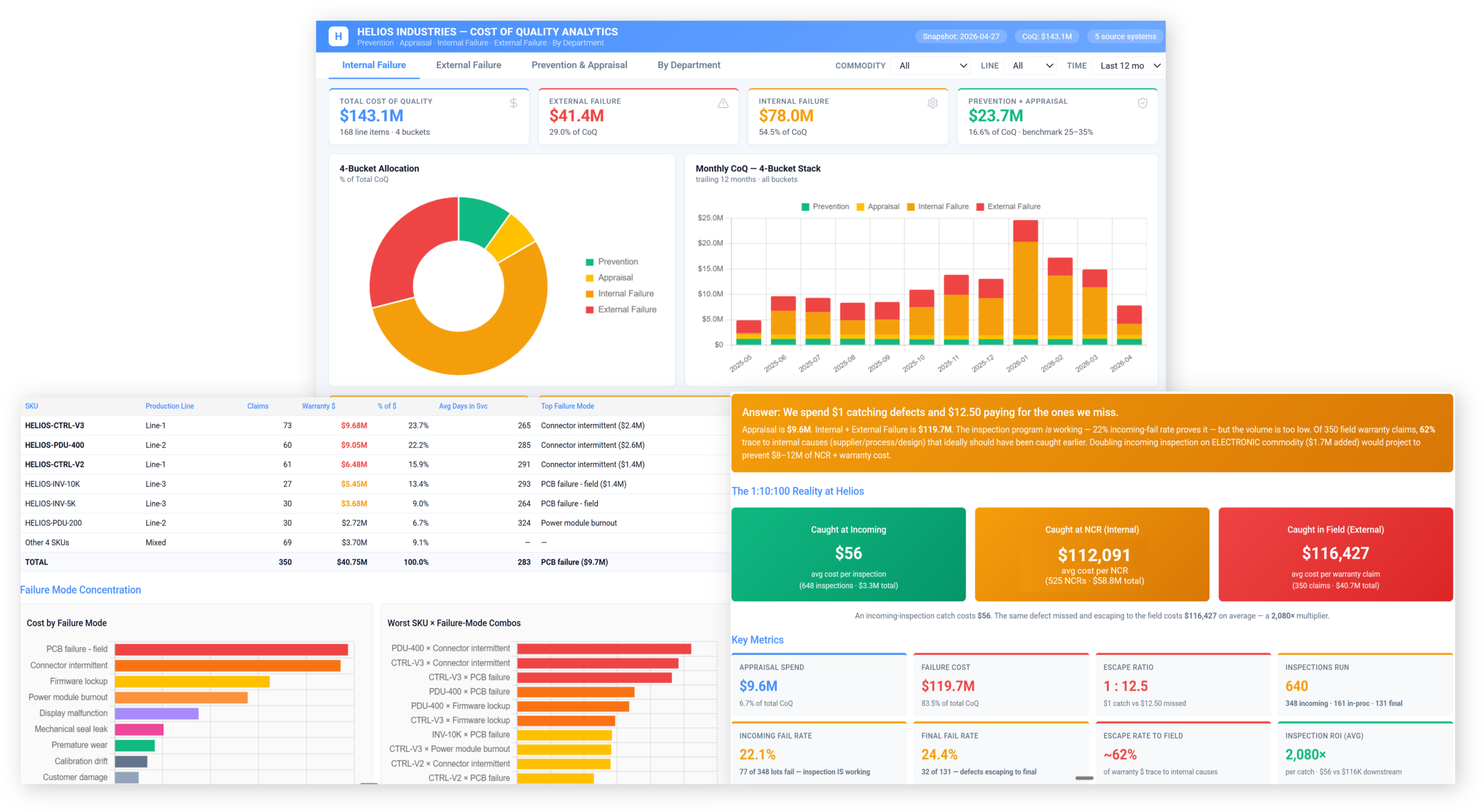
A simplified example of how a mid-sized yacht manufacturer moved from traditional BI and spreadsheet-heavy quality reporting to AI-powered quality analytics—connecting inspections, NCRs, supplier data, warranty issues, drawings, photos, and production records to improve decisions and standard processes.
Quality reviews used to require manual dashboard pulls, spreadsheets, and tribal knowledge; now the team sees issues, trends, and drivers in
near real time.Each yacht contains thousands of custom requirements, inspection points, supplier parts, build steps, photos, and customer-specific quality expectations.
High-mix custom quality dataQuality decisions must connect design intent, production process, supplier performance, in-process inspections, final commissioning, and warranty feedback.
Closed-loop quality managementQuality reviews move from manual reporting to faster AI-assisted insight discovery.
Recurring defects, scrap, rework, and escapes are surfaced earlier and prioritized.
Inspection, NCR, CAPA, supplier, and warranty workflows become more consistent.
Inspection results, nonconformances, photos, and comments are analyzed together.
40–65% faster review cyclesAI highlights recurring failure modes, likely drivers, and corrective-action priorities.
30–60% faster follow-upSupplier defects, late certs, material issues, and incoming inspection trends are connected.
10–25% fewer supplier-related defectsWe used to know where quality issues showed up. Now we understand why they happen and what to fix next.
The objections we hear in the first 20 minutes — answered plainly.
Answer: Traditional BI is usually focused on dashboards and reports that show what happened. AI-powered analytics goes further by connecting data across systems, explaining why results changed, predicting what may happen next, and recommending actions teams can take.
Answer: It can use structured and unstructured data from ERP, CRM, MES, QMS, finance, operations, workflows, tickets, documents, notes, spreadsheets, emails, and external signals. The value comes from connecting fragmented data into a shared business context.
Answer: Yes. AI-powered analytics can analyze patterns, correlations, segments, process changes, exceptions, and supporting context to identify likely drivers behind performance changes. Instead of only seeing the metric, users get a plain-language explanation of the factors that contributed to it.
Answer: No. It supports them. Analysts and leaders stay in control while AI reduces manual reporting, surfaces hidden patterns, summarizes findings, and recommends next steps. The goal is to help teams move faster from data gathering to decision-making.
Answer: The system can prioritize insights, flag risks, recommend next-best actions, assign follow-up tasks, and generate summaries for teams or executives. This helps analytics become part of daily execution instead of ending with a static dashboard.
Answer: No. It is useful anywhere teams need to connect fragmented data and make better decisions, including operations, finance, supply chain, quality, sales, customer service, product management, and executive reporting.
Send us one month of your real operating data. We’ll show you what Praxie would surface from it — your KPIs, your systems, your plant.
No cost, no obligation — and you keep what we find either way.