If you’ve ever watched a line stop while the instruction is technically “right there,” you already know the problem with manufacturing work instructions. The document exists, but people still ask, guess, skip, or invent a workaround. This guide shows how to fix that, and how AI can help turn static instructions into guidance people actually use on the floor.
Manufacturing work instructions are the step-by-step directions that tell someone how to do a task correctly, safely, and consistently. At their best, they reduce variation, shorten training, and protect quality. At their worst, they become another stale file nobody trusts.
What you’ll learn in this guide:
- Why instructions fail on the floor
- What good instructions actually include
- Where AI helps, and where it should not
- How to build AI-ready content
- A practical rollout plan for the next 30 days
Why Manufacturing Work Instructions Break Down on the Floor
Most breakdowns do not happen because people refuse to follow instructions. They happen because the instruction was written for a binder, not for a real task under time pressure. An operator has gloves on, a machine is waiting, the part mix changed, and the step on the page is vague. So they ask a lead, rely on memory, or do what worked last time.
That matters more than many teams admit. When work instructions fail, training slows down, handoffs get messy, first-pass quality drops, and supervisors become full-time answer desks. The cost is not just scrap or downtime. It is the constant friction that makes every shift harder than it needs to be.
The fix is not more documents. It is better guidance, delivered in a way people can use in the moment.
What Manufacturing Work Instructions Actually Are
Manufacturing work instructions are task-level directions for completing a specific job the right way. Think of them as the practical layer between process intent and actual execution. They tell a person what to do, in what order, with what tools, to what standard.
That last part matters. A work instruction is not successful because it exists in a folder. It is successful when two different people can perform the same task and get the same acceptable result. That is the standard worth aiming for.
Work Instructions vs. SOPs vs. Standard Work
These terms get mixed together all the time, and honestly, that confusion causes real messes.
An SOP, or standard operating procedure, usually explains a broader process. It sets expectations for how an operation should run. Standard work captures the current best known method, including sequence, timing, and expected outcome. Work instructions go one level deeper and tell a person exactly how to perform a task.
A simple way to think about it: the SOP says what the process is, standard work defines the current best method, and the work instruction tells the operator what to do at station 4 with tool A and part B.
What Good Work Instructions Need to Include
Good instructions are specific enough to guide action without turning into a novel. They should state the purpose of the task, what it applies to, the tools and materials needed, and any safety notes that cannot be missed. Then they need a clear step sequence, quality checks at the right points, and a way to escalate when something is off.
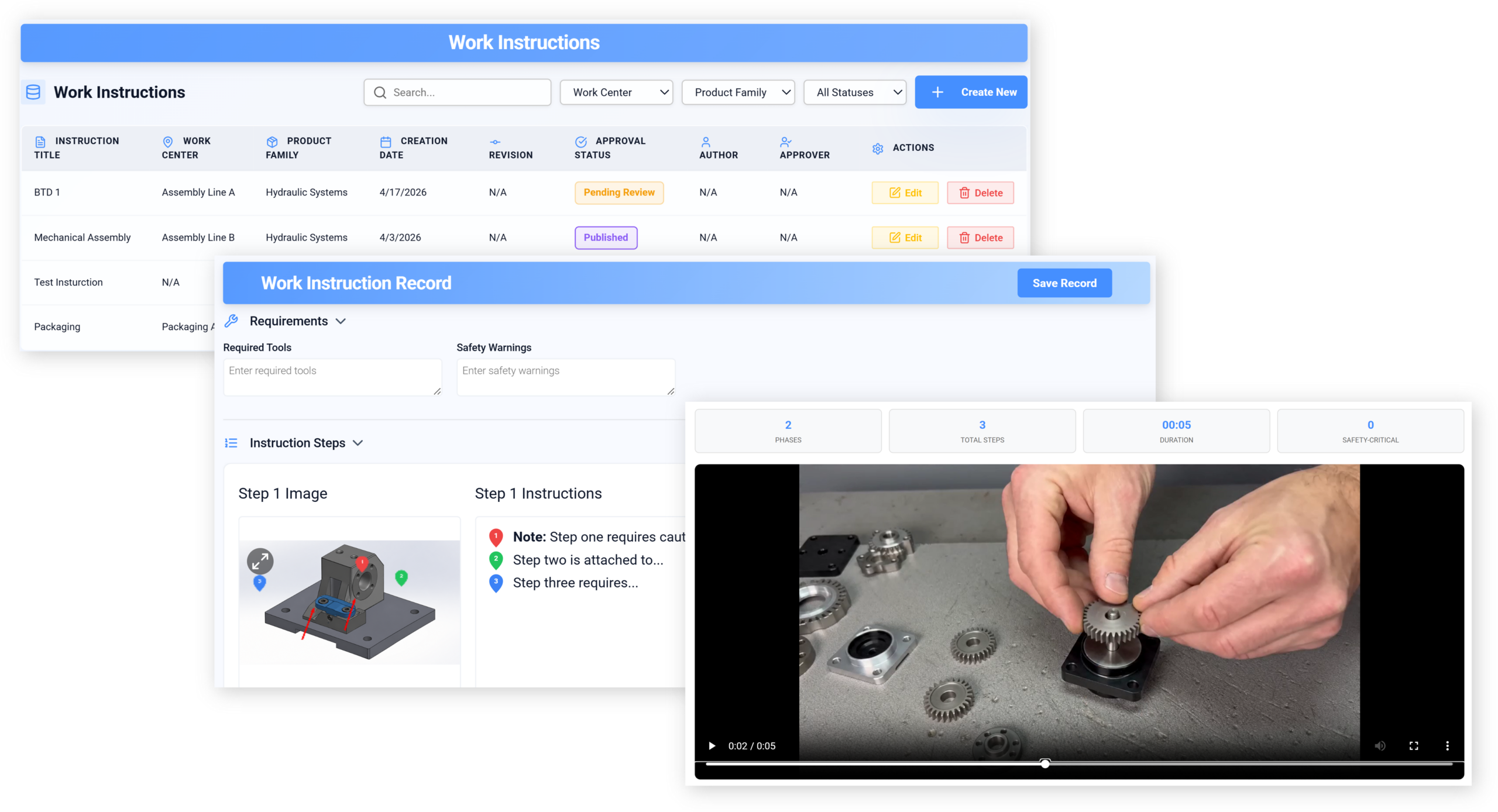
Visuals matter too. A labeled photo, torque screenshot, or short clip often clears up what three paragraphs of text never will. If your team is exploring using short video-based documentation on the floor, this is usually where the payoff becomes obvious.
Why Traditional Work Instructions Stop Working
Paper binders and disconnected PDFs were good enough when products changed slowly, teams stayed stable, and the person doing the job had years of repetition behind them. That is not most factories now.
Traditional instructions fail for predictable reasons: they go out of date, formatting varies wildly, photos are bad or missing, and people cannot tell which revision is current. One station has a printout from last month, another has a screenshot from an email, and the lead has “the real version” on a desktop somewhere. That is not a system. That is organized hope.
And here is a direct claim: paper PDFs are not enough for modern production. Not if you care about speed, consistency, and change control.
The Skills Gap and Knowledge Drain Problem
A lot of process knowledge still lives in people’s heads. The veteran operator knows the sound a feeder makes before it jams. The setup tech knows which clamp tends to drift on the second run. None of that shows up in a thin instruction with six vague steps.
Retirements, turnover, and cross-training make this worse. You can no longer assume that the person doing the job has seen every variation before. Instructions need to capture what experienced operators notice, including decision points and subtle checks, without slowing the work down.
Where Static Documents Create Rework and Delay
Static documents tend to fail at the exact moments when clarity matters most. A step says “verify fit,” but does not show what good fit looks like. A revised torque value exists, but the station still has the old printout. A new operator hits an exception and the document offers no path except “contact supervisor.”
The result is familiar: rework, delays, extra interruptions, and quality escapes that were completely preventable. If you are building toward AI-assisted guidance that can answer task questions in context, this is the gap it is trying to close.
The AI Upgrade: What Changes and What Stays the Same
AI does not replace process ownership. It does not make a bad process good. It does not get to invent tolerances, skip safety controls, or approve engineering changes.
What it can do is upgrade how instructions are created, updated, delivered, and improved. That is the real opportunity. The process still needs to be right, but AI can help you get the right guidance to the right person faster, with less manual rewriting and less drift across versions.
What AI Can Do Inside Work Instructions
Used well, AI is a very practical helper. It can draft first versions from SOPs or engineering notes, turn dense documents into task steps, summarize technical content, translate instructions, suggest missing warnings, and recommend where a photo or diagram would reduce ambiguity.
It can also make instructions easier to search. Instead of hunting through folders, an operator can ask a plain-language question like “what torque for the left bracket on variant C?” and get the relevant answer from approved content. That sounds fancy, but it is really just better retrieval wrapped in a simpler interface.
What AI Should Not Be Allowed to Decide Alone
Safety steps, quality limits, controlled parameters, and change approvals still need human review. Full stop.
The issue is not fear of AI. It is control. If a generated instruction changes a tolerance, misses a lockout step, or blends two product variants, the consequences are real. AI can assist authoring and delivery, but approved content still needs clear ownership, review, and release rules.
The All-in-One AI Platform for Orchestrating Business Operations
The Building Blocks of AI-Ready Work Instructions
Before any AI layer becomes useful, the content underneath has to be clean enough to work with. Here’s the thing: messy inputs create messy guidance. If instructions are inconsistent, unlabeled, duplicated, and ownerless, AI will simply help you spread the confusion faster.
AI-ready does not mean perfect. It means structured, consistent, and governed.
Standardize the Format First
Start with one template family, not twenty. Define how titles work, how steps are numbered, how warnings appear, and what terminology gets used for tools, parts, and actions. “Install,” “attach,” and “mount” may feel interchangeable to a writer, but they create noise for both people and systems.
A common format also makes instructions easier to scan. Operators learn where to find tools, checks, visuals, and escalation notes because every instruction follows the same pattern.
Add the Context AI Needs
Metadata sounds technical, but it is just labeling content so the system knows when it applies. Useful labels include machine, line, product family, station, skill level, revision, language, safety category, and part variant.
That context is what lets a system show the right instruction at the right moment. Without it, search gets sloppy and personalization falls apart. If your broader stack is still fragmented, it helps to understand what to validate before connecting systems across manufacturing tools.
Build in Version Control and Approval Paths
If no one knows which version is live, stop there and fix that first.
Every instruction should have authorship, revision history, approvals, effective dates, and an audit trail. That is not bureaucracy for its own sake. It is the minimum needed to trust the content. Once AI enters the workflow, governance matters even more because changes can be generated quickly. Speed is only helpful when control keeps up.
How to Create Better Work Instructions, Step by Step
The best work instructions come from observing work, not from filling in a template in a conference room. The trick is to document reality, including the decisions and checks people make mid-task, instead of the clean version everyone wishes were true.
Start With Task Analysis, Not Template Filling
Go watch the job. Break it into steps. Note where the operator pauses, checks something twice, adjusts for variation, or asks for help. Capture failure modes, common mistakes, and what “good” looks like at each checkpoint.
This is where many instructions go wrong. They document the planned sequence, not the actual one. If a trained operator always inspects orientation before fastening, that belongs in the instruction, even if the original engineering note buried it in a footnote.
Write Steps People Can Use Mid-Task
Write steps as actions. Start with the verb. Keep each line focused on one action when possible. Define terms once, then use them consistently. And wherever a step can fail, include pass/fail criteria that a person can actually apply.
“Inspect connector” is weak. “Confirm latch is fully seated and red mark is not visible” is usable. That kind of specificity cuts questions fast.
Warnings, notes, and callouts have their place, but use them with discipline. If everything is highlighted, nothing stands out.
Use Visuals, Video, and Interactive Elements Where They Pay Off
Text is good for sequence. Visuals are better for orientation, placement, acceptable conditions, and defect examples. A photo with arrows can settle confusion instantly. A 20-second clip can show a motion that text keeps mangling.
Interactive elements help when completion or data capture matters. Checklists, confirmation prompts, and required entries create accountability at key points. For repetitive or motion-heavy tasks, breaking work into visual step-by-step guidance often gives teams a much cleaner starting point than rewriting every detail from scratch.
How AI Helps You Create and Maintain Instructions Faster
This is where the time savings show up. Not because AI writes perfect instructions on demand, but because it reduces the slow, repetitive parts of documentation work.
Turn Existing Documents Into Usable Drafts
Most manufacturers already have raw material for instructions: SOPs, engineering notes, training decks, PDFs, handwritten markups, machine manuals. AI can convert those into a first-pass draft with steps, warnings, and suggested sections.
That first pass still needs review for sequence, precision, safety, and applicability. But it is faster to edit a decent draft than to start from a blank page every time.
Speed Up Updates After Engineering or Process Changes
When an engineering change hits, the hard part is often figuring out what else it touches. AI can compare revisions, flag related instructions, suggest edits across similar products, and help identify where a part number, torque, or image may now be wrong.
Used well, this shortens the lag between process change and instruction update, which is often where confusion starts.
Translate and Personalize Without Duplicating Work
One controlled source of truth beats six slightly different copies every time.
AI can help translate instructions into multiple languages, adjust reading level, and present role-based views for operators, trainers, or maintenance staff. That means less duplicate authoring and fewer chances for versions to drift apart. It also improves training materials that operators will actually return to during work, rather than forcing teams to maintain separate onboarding and production documents.
Delivery on the Floor: From Paper to Digital to Guided Work
There is a progression here. Paper binders are the old baseline. PDFs on screens are a small step up. Digital work instructions with controlled revisions are better. Guided work systems go further by presenting the next step, capturing completion, and sometimes validating inputs.
You do not need to jump to the far end on day one. But you do need to know where your current setup stops helping.
When Digital Work Instructions Are Enough
Digital instructions are enough when tasks are fairly stable, variation is limited, and supervision is strong. A tablet, kiosk, or station screen with current controlled content can solve a lot of pain if the real issue is version confusion and poor access.
For many plants, this alone is a big improvement. No more mystery printouts. No more searching through shared drives. Just the current instruction, available where the work happens.
When Guided Work Instructions Make a Real Difference
Guided instructions are worth it when complexity goes up. High-variation assembly, frequent changeovers, quality-sensitive tasks, and training-heavy environments benefit most.
In those settings, the system can prompt the next step, ask for confirmation, require a measurement, or adjust guidance based on product variant. That lowers cognitive load and reduces skipped steps, especially for newer operators.
Where AR, VR, and XR Fit , and Where They Don’t
AR, VR, and XR can be genuinely useful, but only in the right situations. AR works best when hands-free overlay guidance helps with orientation or sequence. VR is more useful for training, especially when the real task is risky, expensive, or hard to simulate on a live line.
The catch is that immersive tech is not a shortcut past weak content. If your steps are unclear in a PDF, they will still be unclear floating in someone’s field of view. Fix the instruction first, then decide if advanced delivery is worth the setup.
Best Practices That Make Work Instructions Stick
Some instructions are technically accurate and still fail. Usually because they were written for the author, not the user.
Design for the Real User, Not the Author
A new operator needs more context, clearer visuals, and fewer assumptions. An experienced operator wants fast access to the one detail that changed. Good instruction design respects both realities.
That means readable layouts, predictable structure, plain language, and accessibility choices that hold up on a noisy floor. Font size, contrast, translation quality, and screen placement matter more than people think.
Make Feedback Part of the Instruction System
The best instructions improve in use, like a recipe you keep adjusting until it finally works.
Give operators a simple way to flag unclear steps, missing photos, wrong values, or improvement ideas. If feedback disappears into a black hole, they stop sending it. If it gets reviewed and corrected quickly, the system gets stronger every week.
Tie Instructions to Quality, Safety, and Training
Work instructions should not sit off to the side as a document library nobody owns. They should connect to quality checks, safety procedures, onboarding, and skills tracking. That is how instructions become part of daily operations instead of an afterthought.
How to Roll Out AI-Enhanced Work Instructions Without Disrupting Production
Most rollouts fail for a boring reason: they try to rebuild everything at once. That approach burns time, overwhelms teams, and creates a lot of change fatigue before anyone sees a win.
Pick the Right Pilot Area
Choose a process with visible pain, manageable complexity, and repeatable work. Look for frequent questions, training drag, recurring rework, or lots of variation by operator. A pilot also needs a supervisor who will engage and a team willing to give honest feedback.
Avoid the messiest area in the plant for your first round. You want a meaningful test, not a rescue mission.
Get Buy-In From Operators, Engineers, and IT
Operators care whether it is usable and accurate. Engineers care whether the content reflects the process. IT cares about access, integrations, permissions, and support. All three are right to care.
Bring them in early. Ask operators where instructions fail today. Ask engineers how controlled changes will be reviewed. Ask IT what will break if you choose a tool that does not fit the stack. If AI is part of the plan, getting the rollout and governance side right matters as much as the features.
Start Small, Then Build a Repeatable Playbook
Run a pilot, measure it, adjust the template and workflow, then standardize what worked. From there, expand by line, product family, or site.
I’ve seen teams save months just by resisting the urge to boil the ocean.
How to Measure Whether the Upgrade Is Working
If the only feedback is “people seem to like it,” you do not have enough. Better instructions should show up in operating results and in the health of the content system itself.
Operational Metrics to Track
Watch training time, time-to-proficiency for new hires, first-pass yield, rework, scrap, deviations, supervisor calls, and downtime tied to operator error. These numbers tell you whether guidance is changing behavior on the floor.
Do not expect every metric to move at once. If a pilot reduces supervisor interruptions and shortens onboarding in 60 days, that is already meaningful progress.
Content Health Metrics to Track
You also need to know whether the instruction system is getting healthier. Track revision cycle time, outdated instruction count, usage rates, search success, feedback volume, and how quickly flagged issues get corrected.
A healthy system is not one with zero feedback. It is one where feedback is easy to submit, easy to review, and visibly acted on.
What Good Looks Like After 90 Days
After 90 days, good usually looks pretty practical. Fewer workarounds. Faster onboarding. More consistent execution across shifts. Clearer ownership of changes. Less time spent hunting for the right version or answering the same question ten times a day.
That is the kind of progress worth building on.
Choosing Software for Manufacturing Work Instructions and AI
Software matters, but not as much as fit. Buying a platform before fixing ownership is a mistake. A shiny interface will not solve weak governance, unclear templates, or missing review paths.
Must-Have Features
Look for templates, approvals, version control, multimedia support, search, role-based access, multilingual support, audit trails, and reliable delivery on mobile devices or shop-floor screens. Those are table stakes.
If you want a deeper view of the platform side, it helps to compare what manufacturing teams should expect from instruction tools before getting distracted by AI demos.
AI Capabilities Worth Paying Attention To
Focus on capabilities that remove real manual work: document conversion, summarization, translation, question answering from approved content, content recommendations, change impact analysis, and governed authoring support.
Ignore vague promises about “intelligence” if the system cannot show you where content came from, who approved it, and how it handles controlled changes.
Integration and Governance Questions to Ask
Ask how the system connects to MES, ERP, QMS, LMS, PLM, and identity management. Ask what data it needs, who can publish changes, how permissions work, and how approvals are enforced.
The best tool is the one your team can actually govern, support, and scale without building a second admin job around it.
Examples of AI-Enhanced Manufacturing Work Instructions in Practice
This gets easier to picture with real scenarios.
Assembly Line Example
An operator logs into a station screen and the system loads the correct assembly flow based on the scanned product variant. Each step includes a photo, the required tool, torque value, and a quick quality checkpoint. If the torque wrench records a value outside tolerance, the instruction pauses and routes the issue for review before the build continues.
That is not futuristic. It is just controlled guidance tied to execution.
Changeover and Setup Example
A setup tech selects the machine and SKU, and the system brings up the right changeover sequence, with machine-specific notes and photos of common adjustment points. AI helps by surfacing the correct sequence for that combination, highlighting what changed from the last version, and answering plain-language questions during the setup.
Missed steps go down, especially when less-experienced staff handle the changeover.
Training and Cross-Training Example
A new operator gets interactive instructions that combine text, short clips, and built-in checks. The content is available in the operator’s preferred language, and the supervisor can verify completion and observed proficiency without building separate training documents from scratch.
That shortens ramp time and makes cross-training less dependent on whoever happens to be free that day.
Common Mistakes to Avoid
There are a few mistakes that waste a lot of time fast.
Treating AI Output as Final Content
Generated content is a draft, not an approved instruction. Publishing it without review is asking for trouble, especially around safety, quality, and regulated steps.
Human validation is not optional here. It is the point where trust gets earned.
Digitizing Bad Instructions Instead of Fixing Them
Moving a confusing PDF onto a tablet does not improve the process. It just makes confusion easier to access.
If the source content is vague, outdated, or poorly structured, digitizing it may improve access but not execution. Clean up the instruction itself first.
Ignoring Governance, Operators, or Change Management
Weak ownership, no update process, and zero operator input will sink the effort, even with good software. Adoption problems are usually process problems in disguise.
If people do not trust the content, they will work around it. And once that habit sets in, winning it back gets harder.
Your Practical Upgrade Plan for the Next 30 Days
Start with an audit of one instruction family, not the whole library. Pick a high-friction task, review the current version, observe the work, and compare the document to reality. Standardize a cleaner template, including tools, steps, visuals, checks, and escalation notes.
Then test AI on that narrow slice. Use it to convert existing material into a draft, suggest clearer phrasing, identify missing warnings, or create a translated version. Put human review around every release. Define success before rollout, using a few metrics you can actually track, such as supervisor interruptions, training time, and revision turnaround.
This week, pick one high-friction instruction, rewrite it into a cleaner template, and notice what questions stop showing up. Then share that result back with your team or peers, because a small win on one task is usually how the bigger upgrade finally gets moving.