If your operators still stop the line to ask, “Which version are we using?”, you do not have an instruction problem, you have a delivery problem. Good work instruction software fixes that by getting the right step, to the right person, at the right time, without the usual binder drift, tribal knowledge, and rework that pile up quietly until they get expensive.
What Work Instruction Software Actually Solves on the Floor
Most manufacturing teams know the pattern. A process gets updated, someone prints the new page, someone else forgets to swap the old one, and within a week two stations are following different versions of the same job. Then supervisors spend half their day answering repeat questions that should not need a conversation in the first place.
Work instruction software is a digital system for creating, delivering, updating, and tracking step-by-step production instructions. In plain English, it replaces static paper or scattered files with a controlled way to show people how to do the work, confirm they saw it, and keep revisions from turning into guesswork.
Paper instructions break faster than most teams realize. Not because paper is inherently bad, but because manufacturing changes constantly. Parts change, tolerances move, customer requirements shift, and quality teams add checks. A paper process can look stable while the real process has already moved on.
That is why this category matters more now, especially for teams bringing AI into production. If you are exploring how AI-supported instructions fit on the floor, the real value is not novelty. It is reducing the lag between process change and operator clarity.
Core Features That Matter Most
Vendors will happily show you every button in the platform. That is not the same as showing you what will actually help your plant. The features that matter are the ones that reduce friction for the people writing instructions, the people using them, and the teams responsible for quality and systems.
Easy Authoring for Process Owners
If updating a work instruction means opening a ticket and waiting two weeks, the software is already failing. Engineers, supervisors, quality leads, and process owners need to be able to create and revise content themselves, with guardrails, but without depending on IT for every small change.
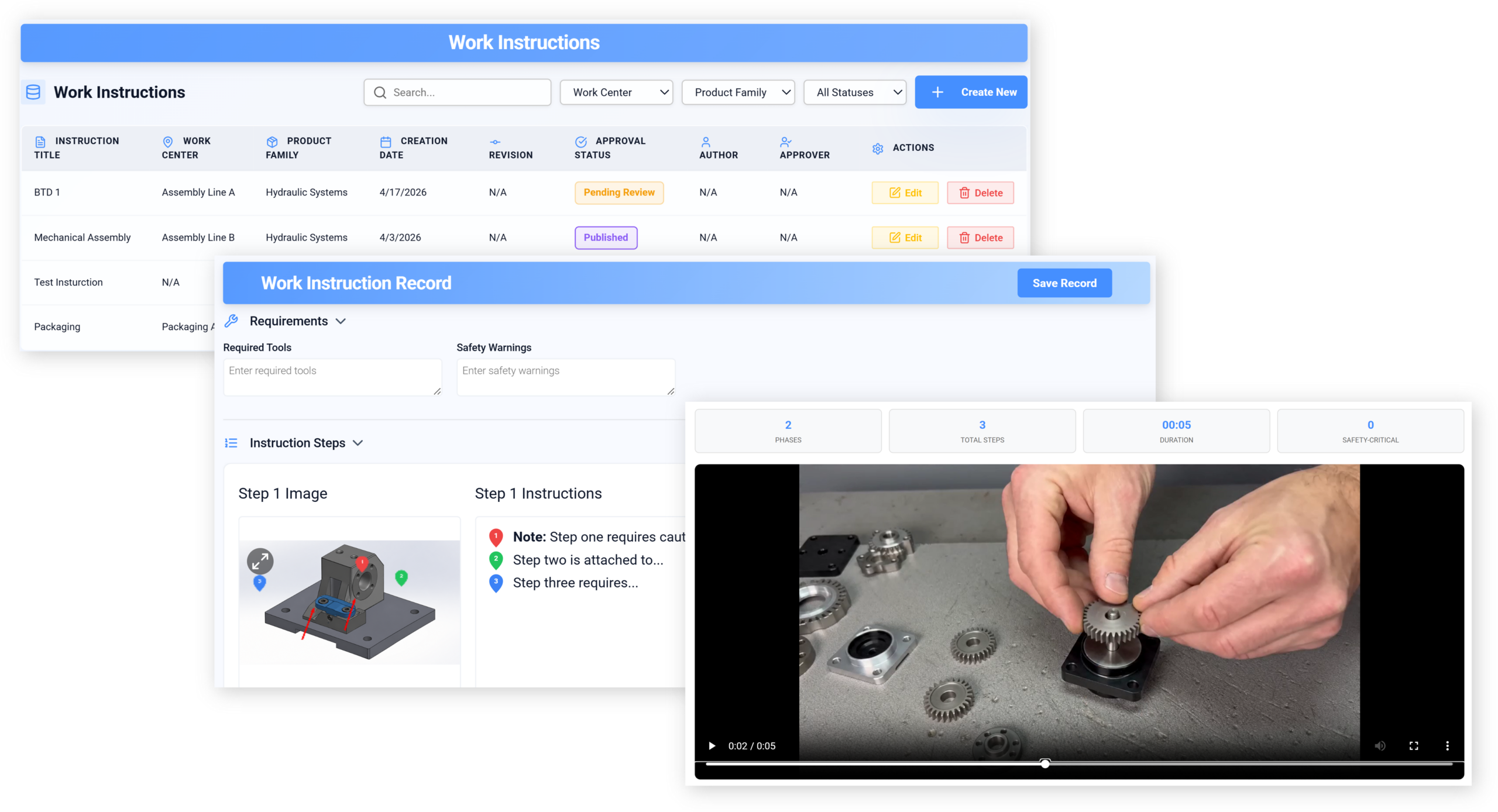
Look for authoring tools that feel closer to building a slide deck than configuring a database. Drag-and-drop layouts, reusable templates, clear version control, and simple approval routing matter more than flashy design options. The goal is fast, accurate updates. Not a digital art project.
Support for photos, short video clips, callouts, arrows, and annotations matters a lot on the floor because visual context removes ambiguity fast. A sentence that says “align tab before torque” is fine. A close-up image with the tab circled is better. In some environments, showing work through step-based video can cut authoring time and improve consistency at the same time.
Shop-Floor Usability
This is where many buying decisions go wrong. Managers buy for admin convenience, then operators get a cluttered interface that takes six taps to reach a step they use 40 times a shift. People will work around that. Every time.
The best operator experience is boring in the best way. Large, clear screens. Fast loading. Minimal tapping. Visual steps that can be understood at a glance. Search that actually finds the right instruction by part, station, or work order. If teams work in noisy, messy, glove-on conditions, the software should still be usable without fuss.
Multilingual support matters if you want one standard process across a mixed workforce. So does offline access in plants where Wi-Fi drops in inconvenient corners. Accessibility matters too, especially for text size, contrast, and media playback. The trick is simple: if it slows people down, they stop trusting it.
AI and Automation Capabilities
AI gets slapped on a lot of software right now, often with very little to show for it. In this category, AI should mean practical help. It should draft first-pass instructions from existing process notes, suggest edits when a step is unclear, flag missing warnings or checks, translate content, and surface the right instruction based on the job, station, machine state, or operator role.
That is useful. A chatbot floating in the corner with no connection to your process data is not.
The catch is that AI should reduce admin work, not create another system to babysit. If a platform needs constant prompt tuning, manual cleanup, or separate governance just to keep outputs usable, you are not saving time. You are moving the same burden around. Good AI support feels like having a sharp coordinator in the background, not a new employee who needs training every day.
Traceability, Compliance, and Audit Readiness
For regulated manufacturing, or honestly any operation with quality pressure, traceability is not optional. You need digital sign-offs, training records, revision history, approvals, and role-based access that makes it clear who can create, review, release, and retire instructions.
This matters during audits, of course. But it also matters on an ordinary Tuesday when a defect appears and you need to know who saw which version, when they saw it, and whether the instruction was approved at the time. Work instruction software should make that answer easy to prove, not painful to reconstruct from email threads and printed initials.
The Main Types of Work Instruction Software
The market is not one neat category. Different products solve different layers of the problem, which is why demos can feel confusing if you are not sorting them correctly from the start.
Standalone Digital Work Instruction Tools
These are dedicated platforms focused mainly on authoring, publishing, and delivering instructions. They tend to be easier to roll out, easier to learn, and faster to pilot because they are built around one job: making instructions usable.
They are often a good fit for teams replacing binders, PDFs, or shared folders and wanting visible improvement quickly. The downside is that you may need integrations to connect them cleanly to the rest of your environment. If your process depends heavily on live production data, standalone tools can feel a little isolated unless the vendor handles connections well.
MES-, QMS-, or ERP-Connected Solutions
Some instruction capabilities live inside larger systems. MES means manufacturing execution system, the software tracking production operations on the floor. QMS means quality management system. ERP means enterprise resource planning, the broader system handling planning, inventory, purchasing, and related business processes.
These connected options make sense when instructions are tightly tied to work orders, routing, quality events, or lot traceability. You may get deeper control and cleaner data flow, especially if your organization already runs one of these systems heavily. The trade-off is speed and flexibility. Larger enterprise platforms can take longer to configure, and authoring may be less friendly for process owners.
No-Code and AI-First Platforms
These newer platforms promise faster setup, easier workflow building, and AI-assisted content generation. They can be a strong fit for teams moving fast, especially high-mix operations where instructions change frequently and no one wants a six-month deployment before seeing value.
But governance matters more here, not less. Fast creation is great until every team names things differently, duplicates content, or publishes half-checked instructions. No-code is helpful. No control is not. If you are using these tools as part of broader process automation on the plant side, make sure the workflow logic and ownership model are clear from day one.
The All-in-One AI Platform for Orchestrating Business Operations
How to Match the Software to Your Production Environment
A platform can look impressive in a demo and still be wrong for your floor. Fit depends less on general feature count and more on how your production actually behaves.
High-Mix, Low-Volume vs. Repetitive Production
In high-mix, low-volume environments, instructions need to flex constantly. Jobs change, variants pile up, and the cost of stale content is high. You want fast revision cycles, dynamic content based on product or station, and strong search so operators can get to the exact version fast.
In repetitive production, the challenge is different. You are not juggling as much variation, but consistency matters more than ever because small errors repeat all day. In that environment, simple delivery, clear visual sequencing, and airtight version control usually matter more than advanced branching logic.
Single Site vs. Multi-Site Operations
A single plant can often move faster because ownership is obvious and local practices are easier to align. Multi-site operations need more structure. Standardize too loosely and every location drifts. Standardize too hard and local realities get ignored.
Good software for multi-site use should support centralized templates, local variations, permissions by plant or line, and language support that does not turn updates into a manual translation mess. If global consistency matters, you want one source of truth with controlled room for local adaptation. Think of it like a chain restaurant recipe: the core dish stays the same, but the kitchen still needs instructions that fit its equipment and flow.
New Hire Training vs. Continuous Improvement
Some teams mainly need faster onboarding. They want new operators to become competent sooner, with fewer shadowing hours and fewer preventable mistakes. For that, clear visuals, guided steps, and acknowledgment tracking do a lot of the heavy lifting. Strong training tools operators will actually use become part of the value story, not an extra module nobody touches.
Other teams want more than training. They want a system that captures process changes, quality feedback, recurring issues, and improvement ideas so instructions evolve with the work. That requires feedback loops, easier editing, analytics, and ownership beyond HR or training alone. If continuous improvement is the goal, static publishing is not enough.
Integration and IT Questions You Need Answered Early
This is the part that gets skipped in early excitement, then returns later as a problem wearing a badge that says “unexpected complexity.”
Connections to MES, ERP, PLM, QMS, and IoT
Integrations matter because instructions rarely live in isolation. MES ties instructions to jobs and operations. ERP links them to parts, revisions, and production planning. PLM means product lifecycle management, where engineering changes often originate. QMS connects the content to controlled quality processes. IoT means internet of things, usually machine or sensor data that can trigger the right instruction or collect completion context.
In practice, you want to know whether the software can pull the right part data, push completion records back upstream, tie revisions to engineering changes, and trigger content by work order or station condition. If the vendor gets vague here, pause. A lot of pain in this category comes from assuming “integration available” means “integration ready.” For a deeper look, it helps to review what to verify before connecting plant systems.
Security, Permissions, and Deployment Model
IT managers need boring answers here, and boring is good. Is the system cloud-based, on-premises, or both? Does it support single sign-on, user provisioning, role-based permissions, audit logs, and data retention controls? How does the vendor handle encryption, backups, incident response, and customer data separation?
Operational risk matters as much as cyber risk. If permissions are messy, the wrong person can publish the wrong revision. If administration is painful, workarounds appear. A secure system should also be manageable, because security that no one can operate cleanly tends to decay.
Implementation Effort and Change Management
Ask who owns rollout, how much legacy content has to be migrated, and what the first phase actually includes. A realistic pilot usually targets one line, one family of products, or one process with frequent changes. That is enough to test authoring, approvals, operator use, and integration assumptions without boiling the ocean.
And honestly, every “simple rollout” somehow uncovers one ancient spreadsheet nobody wants to lose.
That is normal. The better question is whether the vendor has a practical migration path and whether your internal team has clear ownership for content, approvals, training, and support. If you expect the tool alone to force behavior change, it will disappoint you. Teams adopting digital instructions alongside AI should also think through how process changes get introduced without chaos.
Pricing, Budget, and Return on Investment
Price matters, but sticker price alone is a weak way to compare options. The real cost shows up in rollout effort, integration work, content migration, admin overhead, and how much value the platform actually unlocks once the novelty wears off.
Common Pricing Models
Vendors typically charge per user, per site, per production line, or through an enterprise license. Each model pushes behavior in different ways. Per-user pricing can look affordable early, then climb fast if you want broad operator access. Per-site or per-line pricing is easier to forecast for larger deployments but may feel expensive for a smaller pilot.
Then there are add-ons. AI features, analytics, integrations, premium support, implementation help, and advanced compliance controls are often priced separately. Ask for clarity early. A low entry price that excludes the functions you actually need is just delayed disappointment.
Where the Real Payback Comes From
The best ROI usually comes from fixing repeat friction, not chasing flashy features. Faster onboarding, fewer assembly mistakes, cleaner changeovers, less scrap, quicker updates, and fewer compliance scrambles all add up because they happen again and again.
That is why a platform that saves three minutes on a task performed 200 times a week can beat one with impressive dashboards nobody uses. If a recurring process change currently takes days to communicate and verify, cutting that to hours has real operational value. Same with reducing the supervisor interruptions caused by vague or outdated instructions.
Common Buying Mistakes Manufacturing Teams Make
The mistakes here are predictable, which is good news because predictable mistakes are easier to avoid.
Buying for Features Instead of Adoption
A feature-packed platform can still fail if operators, supervisors, and engineers avoid using it. Adoption is the whole point. If the authoring flow is annoying, content goes stale. If the floor experience is clunky, people fall back to memory, sticky notes, and asking the person next to them.
Buy for daily behavior, not demo theatrics. The software should fit the work instead of asking the work to bend around the software.
Ignoring Content Governance
Without ownership, naming rules, approvals, and revision discipline, digital instructions become a cleaner-looking mess. Duplicate content appears. Old instructions stay active. Teams stop trusting what they see.
Governance does not need to be heavy, but it does need to exist. Decide who authors, who approves, what naming convention you use, how changes are requested, and how obsolete content gets retired. The system should support that model, not leave you to improvise it later.
Treating AI as the Strategy
AI is a tool, not a strategy. Buying a platform because it says “AI-powered” tells you almost nothing about whether it will improve work. Start with one painful bottleneck, repeated updates, translation delays, missing revision control, inconsistent training, and test whether AI actually removes work there.
If it does, great. Expand from proof, not hope.
What a Smart Shortlist Looks Like
A good shortlist is not a popularity contest. It is a practical filter based on your environment, your constraints, and the one or two problems you most want to fix first.
Questions to Ask in a Demo
Ask the vendor to show how long it takes to create a new instruction from scratch, revise an existing one, route it for approval, publish it, and confirm who has acknowledged it. Ask how multilingual content is managed, how search works on the floor, and how revision history appears during an audit.
Then ask what the AI does out of the box versus what needs setup, templates, or training data. That distinction matters more than the label. Also ask how analytics work. Can you see which instructions are used, where people hesitate, and where revisions cluster? If not, improvement will stay harder than it should be.
Best-Fit Recommendations by Use Case
Fast-growing plants usually benefit from software that is easy to deploy, simple to author in, and flexible enough to keep up with process change. Regulated manufacturers should lean harder toward traceability, approvals, role controls, and audit evidence. Multi-site operations need centralized governance with local flexibility. Teams modernizing paper SOPs should prioritize ease of use over big-system ambition. Companies adding AI to training or quality workflows should focus on whether the platform actually improves updates, translation, and content delivery in day-to-day use.
The best shortlist usually includes one dedicated instruction tool, one system tightly connected to your existing manufacturing stack, and one newer platform with strong no-code or AI capabilities. That mix gives you a fair view of speed, control, and long-term fit.
Try One Thing This Week Before You Buy
Pick a single instruction that changes often or causes repeat errors. Then test how two or three work instruction software tools handle creating it, updating it, approving it, and delivering it to the right station. You will learn more from that one exercise than from ten polished demo decks.
Notice what felt easy, what felt clunky, and where the software either reduced work or quietly added more of it. Try that this week, compare the friction honestly, and share back what you noticed.