


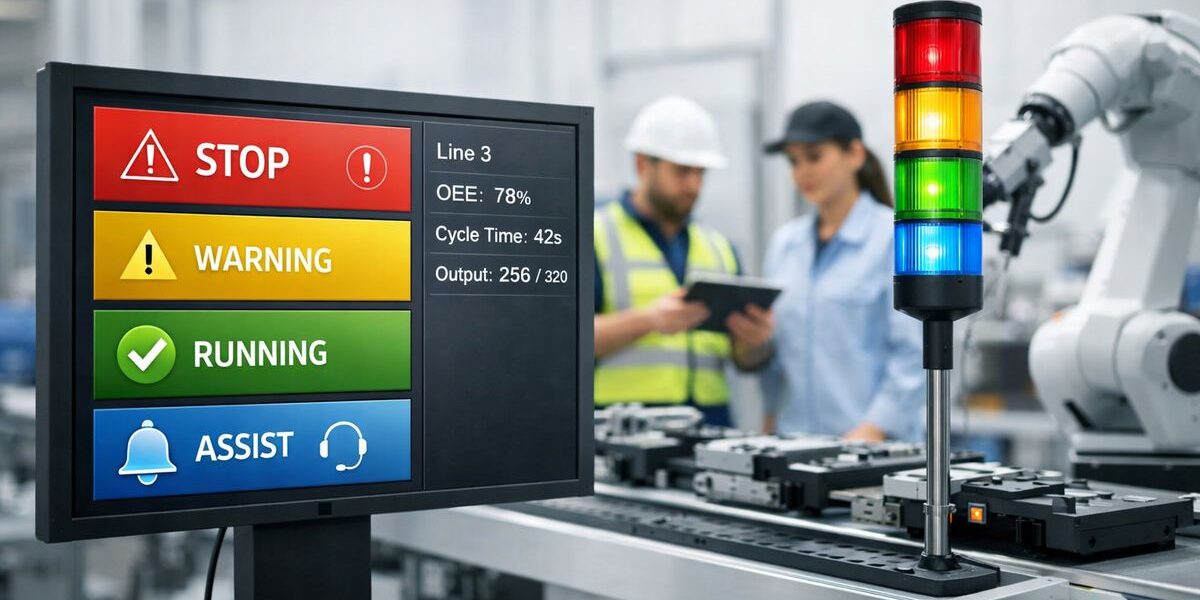
Digital ANDON is a real-time alert and response system that helps your plant spot problems faster, route them to the right person, and track what happened all the way to resolution. If your current process still depends on somebody noticing a flashing light, picking up a radio, and finding the right supervisor before downtime spreads, this is where the difference starts to matter.
What digital ANDON means in a modern plant
At its core, ANDON has always been about making problems visible. In a traditional setup, that usually means stack lights, pull cords, display boards, buzzers, or some other simple signal that says: something needs attention right now.
Digital ANDON keeps that same purpose, but extends it. Instead of stopping at the signal, it turns the alert into a managed workflow. That means your plant can capture the issue, notify the right team, track response times, escalate if nobody reacts, and store the event for later analysis.
Think of classic ANDON like a doorbell. You hear it, but somebody still has to decide who answers, how fast, and what to do next. Digital ANDON is closer to a smart dispatch system. The signal still matters, but the follow-through is built in.
From “something’s wrong” to “here’s who needs to fix it”
This is the real shift.
Traditional ANDON tells your operation that a problem exists. Digital ANDON tells your operation exactly who should respond, how quickly, what status the issue is in, and whether it actually got resolved. That sounds like a small upgrade until you picture a busy floor with multiple lines, shared technicians, quality holds, and support teams moving between areas.
In practice, digital ANDON changes an alert from a passive signal into an active process. Instead of waiting for the right person to notice and interpret the problem, your system can route a maintenance call to maintenance, a material shortage to materials, and a quality concern to quality. That cuts delay, but just as important, it removes guesswork.
Why traditional ANDON starts to break down
A machine stops. A light flashes. Ten minutes pass before somebody notices. Another few minutes go by while a supervisor tries to track down maintenance. By the time the right technician arrives, what should have been a short interruption has become a production problem.
That scenario is common because lights alone are no longer enough for complex, fast-moving operations. Traditional ANDON still has value at the point of use, but once your plant depends on speed, coordination, and data, the cracks show fast.
Delayed response and manual handoffs
The problem is not the signal itself. The problem is everything that happens after it.
If alerts rely on line-of-sight, radio calls, whiteboards, or somebody walking the floor, response time becomes inconsistent by default. One issue gets handled in two minutes because the right person happened to be nearby. Another sits for twelve because nobody knew who owned it.
Manual handoffs also create friction between teams. Production calls maintenance. Maintenance asks for more detail. Quality gets pulled in later. Materials never hears about the issue until the line is already starved. None of that feels dramatic in the moment, but it adds up shift after shift.
Data gaps that make repeat problems harder to fix
Even if your plant logs issues, old methods usually leave holes. Paper notes get lost. Spreadsheet entries happen later, when details are fuzzy. Cause codes are inconsistent. Resolution steps live in somebody’s memory instead of in a usable record.
That makes continuous improvement harder than it should be. You cannot fix repeat problems well if your issue history is incomplete, delayed, or disconnected. A stoppage that shows up three times a week can still look random if nobody captures the same reason the same way every time.
Here’s the catch: most recurring plant problems do not hide because they are rare. They hide because the trail is messy.
Limited visibility across lines, shifts, and sites
Traditional ANDON works best when everybody is physically close to the signal. One line, one area, one team, one shared view. But once your operation stretches across multiple lines, shifts, buildings, or sites, that model starts to fail.
A flashing light on Line 7 helps the people standing near Line 7. It does not help an off-shift manager reviewing trends, a centralized maintenance planner balancing workload, or an executive trying to understand where response bottlenecks actually live. Digital ANDON gives your alerts reach beyond the immediate area, which is exactly what modern operations need.
How a digital ANDON system actually works
The easiest way to picture digital ANDON is as a chain: trigger, route, escalate, close. Once you see that flow, the concept gets simple.
An issue happens. The system creates an alert. The alert goes to the right people. If nobody responds in time, it escalates. Once the issue is handled, somebody closes it out and records what happened.
Trigger: how alerts get created
Alerts can start in a few different ways. Sometimes an operator presses a button on a screen or panel to request help. Sometimes a machine signal triggers the alert automatically. Sometimes it comes from a quality check, a material shortage, a sensor threshold, or a software event in another system.
If your team uses MES, that just means a manufacturing execution system, software that tracks production activity on the floor. ERP means enterprise resource planning, the business system that handles things like inventory, orders, and purchasing. Digital ANDON can pull signals from systems like these so the alert starts with real context instead of a vague message.
The point is not how flashy the trigger looks. The point is that the event gets captured immediately and consistently.
Route: how the right team gets notified fast
Once the alert exists, routing rules decide where it goes. A downtime event on one line might notify maintenance and the area supervisor. A defect alert might go to quality and production. A missing label request might go straight to materials.
Those notifications can show up on overhead displays, line boards, tablets, phones, email, SMS, or collaboration tools your teams already use. Speed matters, but relevance matters more. If everybody gets every alert, your plant creates noise. If only the right people get the right alert, response gets sharper.
That is one of the biggest upgrades in digital ANDON. It does not just make alerts louder. It makes alerts smarter.
Escalate and close the loop
If no one acknowledges or resolves the issue within a set time, the system can escalate automatically. That might mean notifying a supervisor after three minutes, an area manager after seven, or a backup technician if the primary owner is unavailable.
Then comes closure. Somebody accepts ownership, updates status, records cause, logs action taken, and closes the event when the issue is resolved. That turns the alert into a complete record. Without that step, you only know that something happened. With it, you know what happened, who handled it, how long it took, and whether the same issue keeps coming back.
This is where digital ANDON stops being an alarm and becomes an operating discipline.
The All-in-One AI Platform for Orchestrating Business Operations
 Instantly create & manage your process Use AI to save time and move faster Connect your company’s data & business systems
The core components of digital ANDON
Most digital ANDON systems look different from one plant to another, but the building blocks are usually the same. What matters is function, not the vendor demo.
Real-time visual boards and mobile alerts
You still need visibility. That can include line boards, control-room screens, tablets, operator terminals, and phone alerts. The difference is that the information is live, shared, and not tied to one fixed location.
That changes behavior more than expected. When alerts follow the work instead of staying parked on a board, support teams can respond from wherever the day has pulled them.
Workflow rules, roles, and accountability
A good digital ANDON setup defines who gets what, how fast somebody must respond, when escalation happens, and what counts as closure. It also controls access by role, so operators, supervisors, maintenance, and quality each see the right actions for the job.
That may sound administrative, but honestly, this is where many implementations win or fail. If an alert has no owner, it has no future.
Data capture, history, and analytics
Every event can store timestamps, category, location, cause, response, and outcome. Over time, that history becomes much more useful than the single alert ever was.
Instead of asking why downtime feels worse on second shift, you can look at actual response patterns. Instead of debating which line has the most support delays, you can pull the record. Instead of guessing where repeat quality alerts start, you can trace the pattern.
Integration with plant systems
Digital ANDON gets stronger when it connects to the rest of your plant stack. That may include PLCs, the controllers running your equipment, SCADA systems that monitor and supervise plant processes, MES, CMMS for maintenance work management, ERP, and collaboration tools.
Integration matters because it reduces manual steps and improves context. If a machine stop automatically carries line, asset, shift, and fault information into the alert, your team spends less time translating and more time responding.
Where digital ANDON helps most on the shop floor
This is not just about downtime alarms. Digital ANDON works anywhere your operation loses time because somebody needs help and the path to help is messy.
Machine downtime and maintenance response
Picture a stop event at 2:07 p.m. on Line 3. In a traditional setup, the tower light turns red and somebody starts hunting for maintenance. In a digital ANDON setup, the machine stop can trigger an alert automatically, assign the nearest qualified technician, start a response timer, and escalate if nobody acknowledges it in time.
That can be the difference between a seven-minute interruption and a thirty-minute outage. Not because the repair changed, but because the response path got cleaner.
Quality issues and defect containment
Quality problems get expensive fast when bad parts keep moving downstream. Digital ANDON helps your operators or automated inspection points flag issues immediately, notify quality, and contain the affected material before the problem spreads.
That containment piece matters. A defect caught at the source is an event. A defect discovered three stations later is rework, confusion, and often finger-pointing.
Material replenishment and line support
Material calls are a classic example of hidden delay. A station runs low on parts, labels, packaging, or tooling support. Somebody waves, waits, or leaves the station to find help. Production slows down for a reason that rarely shows up clearly in the records.
Digital ANDON gives those support calls a formal path. The request gets logged, routed, time-stamped, and closed when the item arrives. That makes support visible instead of informal.
Operator assistance and safety-related support
Not every alert is a breakdown. Sometimes an operator needs setup help, supervisor approval, training support, or urgent safety attention. Digital ANDON can handle those requests too, with different routing and priority rules based on the situation.
That flexibility is part of the appeal. You are not just digitizing one type of problem. You are creating a cleaner way for your floor to ask for help.
Digital ANDON vs. traditional ANDON
This is not a simple old-versus-new argument. In many plants, the best answer is both.
What traditional ANDON still does well
Traditional ANDON is immediate, visible, and familiar. A light tower or local display gives instant feedback at the exact place where the issue occurs. That is useful, and there is no need to pretend otherwise.
Simple signals also have a kind of honesty to them. Anybody nearby can see the line needs attention. No login required.
What digital ANDON adds beyond lights and buzzers
What digital ANDON adds is reach, coordination, and traceability. It can notify off-floor teams, manage ownership, enforce escalation rules, create an audit trail, and give your leadership team visibility across lines and sites.
It also creates usable data. That is a big deal if your broader goal includes AI, predictive maintenance, or smarter planning. AI cannot do much with half-complete paper notes and delayed spreadsheets. It needs structured, timely, connected event data. Digital ANDON helps create exactly that.
Why many plants use both together
For many operations, the practical move is to keep stack lights and local boards on the floor while using digital workflows behind the scenes. The physical signal still tells nearby teams something is wrong. The digital layer handles routing, escalation, status, and reporting.
That hybrid model works because it respects how plants actually operate. You do not need to rip out familiar visual tools to gain better response logic.
What to look for if You’re evaluating digital ANDON
If you are evaluating options, focus less on shiny screens and more on whether the system will fit daily reality on your floor.
Configurable workflows instead of rigid alert logic
Every plant handles downtime, quality, and support calls a little differently. Your system should adapt to those differences. If the workflow is rigid, your team ends up working around the software instead of through it.
The trick is to look for a platform that lets you define triggers, owners, escalation paths, and closure steps without turning every change into a custom project.
Easy adoption for operators and supervisors
If logging an issue feels like extra work, usage drops fast. The interface should be simple, fast, and available where the work happens. That may mean fixed terminals, tablets, phones, multilingual prompts, or one-tap inputs that remove friction.
Good adoption is not about training harder. It is about making the right action the easy action.
Strong reporting and continuous improvement support
Counting alarms is not enough. You want to see response times, resolution times, repeat causes, missed escalations, chronic bottlenecks, and trends by line, shift, asset, or issue type.
That is where digital ANDON starts paying beyond the moment of the alert. It gives your team a way to learn from the pattern instead of just surviving the day.
Integration readiness for AI and smarter automation
If AI is on your roadmap, this matters a lot. AI works best when the underlying alert data is structured, current, and connected to plant context. Digital ANDON lays that foundation by turning ad hoc calls for help into standardized events.
Once that data exists, your operation can move toward prediction, prioritization, and smarter recommendations. Without that foundation, AI is mostly wishful thinking.
Common misconceptions about digital ANDON
A few objections show up almost every time this topic comes up. Most sound reasonable at first. Most also miss the point.
“It’s Just a digital version of an alert light”
Not really. A digital screen by itself is not the value. The value is response management, accountability, escalation, and data you can actually learn from. A prettier signal without process behind it changes very little.
“It only makes sense for huge factories”
Smaller plants often feel the payoff sooner because the waste is easier to see. If one missed handoff can idle a line, delay a shipment, or stretch a repair, a cleaner alert flow matters right away.
“You need to replace everything to get started”
You usually do not. Many plants layer digital ANDON onto existing lights, machines, displays, and workflows in phases. Starting small is normal, and often smarter.
“More alerts will just create more noise”
Bad alert design creates noise. Better routing reduces it. If the right person gets the right alert with the right priority and escalation rule, your plant usually ends up with less confusion, not more.
A practical first step for getting started
The best way to understand digital ANDON is to use it on one painful process instead of trying to redesign the whole plant at once.
Start with one use case and one measurable pain point
Pick one alert flow that causes obvious friction today. Maintenance response on a single line is often a strong place to start. Material calls and quality holds work too.
Then measure a few plain metrics: response time, resolution time, repeat incidents, and missed escalations. That gives you a before-and-after picture grounded in real operations, not software promises.
Build the workflow before chasing advanced features
Before anybody talks about AI, dashboards, or fancy automations, get the core flow right: trigger, route, escalate, resolve, review. If that path is clear and easy to use, the system has a real chance to stick.
A clean, simple workflow beats a flashy platform nobody trusts. Start with one high-friction alert, map exactly how it should move from signal to closeout, and fix that flow first. Once your plant can do that consistently, digital ANDON stops sounding like a technology project and starts looking like what it actually is: a better way to run the floor.
